A1.1b Start LUPMIS on a LAN - LUPMISManual
Main menu:
×
- 0. Introduction
- 1. GIS handling
-
2. GIS data entry
- 2.1 Create new layer
- 2.2 Digitize line
- 2.3 Digitize point
- 2.4 Digitize polygon
- 2.5 Edit existing layer
- 2.6 Delete feature
- 2.7 Split line
- 2.8 Split polygon
- 2.9 Merge lines from different layers
- 2.10 Unite lines
- 2.11 Snap lines
- 2.12 Join polygons
- 2.13 Extend polygon
- 2.14 Insert island
- 2.15 Define unit surrounding islands
- 2.16 Create 'doughnut'
- 2.17 Fill 'doughnut' polygon
- 2.18 Fill polygon with 'holes'
- 2.19 Digitize parcels from sector layout
-
3. GIS operations
- 3.1 Create buffer
- 3.2 Create exclusion zone
- 3.3 Overlay units
- 3.4 Convert line to polygon
- 3.5 Derive statistics (area size, length)
- 3.6 Clip unit according to other unit
- 3.7 Create geographic grid
- 3.8 Move entire vector map
- 3.9 Move or copy individual features on a map
- 3.10 Adjust polygon to line
- 3.11 Convert points to polygon
- 3.12 Define by distance
- 3.13 Create multiple objects
- 3.14 Transfer styles from one layer to another
-
4. Attribute database
- 4.1 Start with database
- 4.2 Import database
- 4.3 Display database information
- 4.4 Enter attribute data
- 4.5 Attribute matrix of multiple layers
- 4.6 Seeds
- 4.7 Repair attribute data
- 4.8 Merge lines with attached database
- 4.9 Transfer attribute data from points to polygons
- 4.10 Copy styles, labels, attributes
-
5. Conversion of data
-
5.1 Points
- 5.1.1 Import list of points from text file
- 5.1.2 Import list of points from Excel file
- 5.1.3 Convert point coordinates between projections
- 5.1.4 Convert point coordinates from Ghana War Office (feet)
- 5.1.5 Convert point coordinates from Ghana Clark 1880 (feet)
- 5.1.6 Track with GPS
- 5.1.7 Download GPS track from Garmin
- 5.1.8 Download GPS track from PDA
- 5.1.9 Frequency analysis of points
- 5.2 Vector maps
- 5.3 Raster maps
-
5.4 Communication with other GIS programs
- 5.4.1 Import GIS data from SHP format
- 5.4.2 Import GIS data from E00 format
- 5.4.3 Import GIS data from AutoCAD
- 5.4.4 Export LUPMIS data to other programs
- 5.4.5 Export GIS to AutoCAD
- 5.4.6 Change a shape file to GPX
- 5.4.7 Transfer GIS data to other LUPMIS installations
- 5.4.8 Digitize lines in Google Earth
- 5.5 Terrain data
- 5.6 Export to tables
- 5.7 Density map
-
5.1 Points
-
6. Presentation
- 6.1 Labels
- 6.2 Styles and Symbols
- 6.3 Marginalia
- 6.4 Legend
- 6.5 Map template
- 6.6 Final print
- 6.7 Print to file
- 6.8 3D visualization
- 6.9 External display of features
- 6.10 Google
-
7. GIS for land use planning
- 7.1 Introduction to land use planning
- 7.2 Land use mapping for Structure Plan
- 7.3 Detail mapping for Local Plan
- 7.4 Framework
- 7.5 Structure Plan
- 7.6 Local Plan
- 7.7 Follow-up plans from Local Plan
- 7.8 Land evaluation
-
8. LUPMIS Tools
- 8.1 General
- 8.2 Drawing Tools
-
8.3 Processing Tools
- 8.3.1 UPN
- 8.3.2 Streetname + housenumbers
- 8.3.3 Address Database + tools
- 8.3.4 Format conversion
- 8.3.5 Coordinate system conversion
- 8.3.6 Raster processing
- 8.3.7 Altitude/DTM
- 8.3.8 Other GIS Tools
- 8.3.9 Utilities
- 8.4 Printing Tools
-
8.5 Permit Tools
- 8.5.1 Overview
- 8.5.2 Entry
- 8.5.3 Applicants
- 8.5.4 Parcels
- 8.5.5 Permits
- 8.5.6 Permit Database management
- 8.5.7 Notes for Permit Database
- 8.6 Census Tools
-
8.7 Revenue Tools
- 8.7.1 Overview
- 8.7.2 Entry of revenue data
- 8.7.3 Retrieval of revenue data
- 8.7.4 Revenue maps
- 8.7.5 Other revenue tools
- 8.8 Reports Tools
- 8.9 Settings
-
9. Databases
- 9.1 Permit Database
-
9.2 Plans
- 9.2.1 Accra
- 9.2.2 Kasoa
- 9.2.3 Dodowa
- 9.2.4 Sekondi-Takoradi
-
9.3 Census Database
-
9.4 Revenue Database
-
9.5 Report Database
-
9.6 Project Database
- 9.7 Address Database
-
Annexes 1-10
- A1. LUPMIS setup
- A2. Background to cartography/raster images
- A3. Glossary, index
- A4. Troubleshooting
- A5. Styles
- A6. Classification for landuse mapping/planning
- A7. GIS utilities
- A8. Map projection parameters
- A9. Regions / Districts
- A10. Standards
-
Annexes 11-20
- A11. LUPMIS distribution
- A12. Garmin GPS
- A13. Training
- A14. ArcView
- A15. Population statistics
- A16. Entry and display of survey data
- A17. External exercises
- A18. Programming
- A19. Paper sizes
- A20. Various IT advices
- A21. Contact, references
Annexes 1-10 > A1. LUPMIS setup
A 1.1.b Start LUPMIS on a LAN
In an established network environment, e.g. in a LAN at a TCPD office with an experienced network administrator, LUPMIS can run through the network. Databases (MySQL) are accessed on the central server to ensure that all users have the same tabular data, while - for higher performance - GIS image data are stored locally (see architecture below).
LUPMIS has to be installed on the server, following the standard procedure, as explained in the installation chapter (Annex 1.1). On the workstations (clients), LUPMIS must also be installed the same way.
At the time of log-in, the user decides which data he wants to access, either locally on his/her workstation (e.g. laptop) or on the network server. He should know the IP address of the server (see below, if not known). Preferably, this is a static address, defined at the server by the network administrator. In LUPMIS, select: LAN: Change... > Enter LUPMIS Tools:

Then select the network server from the list of addresses in the LAN, starting with 10.x.x.x or 172.x.x.x or 192.x.x.x.

For security reasons, user name and authorization have to be set from the server. You can not use user name and password from your local LUPMIS installation. These network user name and password are then to be used for every log-in from the work station to the server's data.
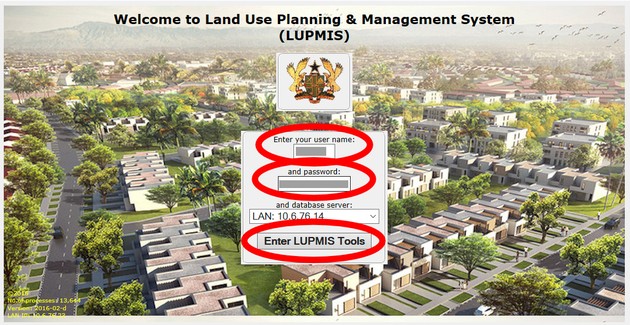
With this log-in, the user can see and retrieve all database data at the server. You can check, for example:

- - - - -
How to check the LAN (internal) address of your network server?
There are various ways to assess the LAN (internal) address of your network server:
a) In LUPMIS, with Settings > System info > Under 'All address on this LAN' > Look for 'this computer'. (It is not the public address).

b) Checking for IP addresses can also be done in Windows at command level through command: cmd /c arp -a

Often, communication to the server can cause a problem. A way to check the integrity of the communication is to 'ping' from the workstation to the server:

If there are still problems, check that MySQL has been started and active, as explained in the previous Chapter (Annex 1.1.a).
- - - - -
Part of architecture for network operation, with different handling of graphical data (GIS) and textual data (MIS):


