8.1.3.2 Alternative GIS: QGIS - LUPMISManual
Main menu:
×
- 0. Introduction
- 1. GIS handling
-
2. GIS data entry
- 2.1 Create new layer
- 2.2 Digitize line
- 2.3 Digitize point
- 2.4 Digitize polygon
- 2.5 Edit existing layer
- 2.6 Delete feature
- 2.7 Split line
- 2.8 Split polygon
- 2.9 Merge lines from different layers
- 2.10 Unite lines
- 2.11 Snap lines
- 2.12 Join polygons
- 2.13 Extend polygon
- 2.14 Insert island
- 2.15 Define unit surrounding islands
- 2.16 Create 'doughnut'
- 2.17 Fill 'doughnut' polygon
- 2.18 Fill polygon with 'holes'
- 2.19 Digitize parcels from sector layout
-
3. GIS operations
- 3.1 Create buffer
- 3.2 Create exclusion zone
- 3.3 Overlay units
- 3.4 Convert line to polygon
- 3.5 Derive statistics (area size, length)
- 3.6 Clip unit according to other unit
- 3.7 Create geographic grid
- 3.8 Move entire vector map
- 3.9 Move or copy individual features on a map
- 3.10 Adjust polygon to line
- 3.11 Convert points to polygon
- 3.12 Define by distance
- 3.13 Create multiple objects
- 3.14 Transfer styles from one layer to another
-
4. Attribute database
- 4.1 Start with database
- 4.2 Import database
- 4.3 Display database information
- 4.4 Enter attribute data
- 4.5 Attribute matrix of multiple layers
- 4.6 Seeds
- 4.7 Repair attribute data
- 4.8 Merge lines with attached database
- 4.9 Transfer attribute data from points to polygons
- 4.10 Copy styles, labels, attributes
-
5. Conversion of data
-
5.1 Points
- 5.1.1 Import list of points from text file
- 5.1.2 Import list of points from Excel file
- 5.1.3 Convert point coordinates between projections
- 5.1.4 Convert point coordinates from Ghana War Office (feet)
- 5.1.5 Convert point coordinates from Ghana Clark 1880 (feet)
- 5.1.6 Track with GPS
- 5.1.7 Download GPS track from Garmin
- 5.1.8 Download GPS track from PDA
- 5.1.9 Frequency analysis of points
- 5.2 Vector maps
- 5.3 Raster maps
-
5.4 Communication with other GIS programs
- 5.4.1 Import GIS data from SHP format
- 5.4.2 Import GIS data from E00 format
- 5.4.3 Import GIS data from AutoCAD
- 5.4.4 Export LUPMIS data to other programs
- 5.4.5 Export GIS to AutoCAD
- 5.4.6 Change a shape file to GPX
- 5.4.7 Transfer GIS data to other LUPMIS installations
- 5.4.8 Digitize lines in Google Earth
- 5.5 Terrain data
- 5.6 Export to tables
- 5.7 Density map
-
5.1 Points
-
6. Presentation
- 6.1 Labels
- 6.2 Styles and Symbols
- 6.3 Marginalia
- 6.4 Legend
- 6.5 Map template
- 6.6 Final print
- 6.7 Print to file
- 6.8 3D visualization
- 6.9 External display of features
- 6.10 Google
-
7. GIS for land use planning
- 7.1 Introduction to land use planning
- 7.2 Land use mapping for Structure Plan
- 7.3 Detail mapping for Local Plan
- 7.4 Framework
- 7.5 Structure Plan
- 7.6 Local Plan
- 7.7 Follow-up plans from Local Plan
- 7.8 Land evaluation
-
8. LUPMIS Tools
- 8.1 General
- 8.2 Drawing Tools
-
8.3 Processing Tools
- 8.3.1 UPN
- 8.3.2 Streetname + housenumbers
- 8.3.3 Address Database + tools
- 8.3.4 Format conversion
- 8.3.5 Coordinate system conversion
- 8.3.6 Raster processing
- 8.3.7 Altitude/DTM
- 8.3.8 Other GIS Tools
- 8.3.9 Utilities
- 8.4 Printing Tools
-
8.5 Permit Tools
- 8.5.1 Overview
- 8.5.2 Entry
- 8.5.3 Applicants
- 8.5.4 Parcels
- 8.5.5 Permits
- 8.5.6 Permit Database management
- 8.5.7 Notes for Permit Database
- 8.6 Census Tools
-
8.7 Revenue Tools
- 8.7.1 Overview
- 8.7.2 Entry of revenue data
- 8.7.3 Retrieval of revenue data
- 8.7.4 Revenue maps
- 8.7.5 Other revenue tools
- 8.8 Reports Tools
- 8.9 Settings
-
9. Databases
- 9.1 Permit Database
-
9.2 Plans
- 9.2.1 Accra
- 9.2.2 Kasoa
- 9.2.3 Dodowa
- 9.2.4 Sekondi-Takoradi
-
9.3 Census Database
-
9.4 Revenue Database
-
9.5 Report Database
-
9.6 Project Database
- 9.7 Address Database
-
Annexes 1-10
- A1. LUPMIS setup
- A2. Background to cartography/raster images
- A3. Glossary, index
- A4. Troubleshooting
- A5. Styles
- A6. Classification for landuse mapping/planning
- A7. GIS utilities
- A8. Map projection parameters
- A9. Regions / Districts
- A10. Standards
-
Annexes 11-20
- A11. LUPMIS distribution
- A12. Garmin GPS
- A13. Training
- A14. ArcView
- A15. Population statistics
- A16. Entry and display of survey data
- A17. External exercises
- A18. Programming
- A19. Paper sizes
- A20. Various IT advices
- A21. Contact, references
8. LUPMIS Tools > 8.1 General > 8.1.3 Output
8.1.3.2 Alternative GIS: QGIS
While Map Maker is the perfect GIS software for processing, checking and digitizing, an increasing number of GIS users worldwide appear to use the open-source GIS software QGIS. Like any GIS software, also QGIS has a lot of pros and cons. Its worldwide user community has created a huge knowledgebase, which can be approached through the Internet. There are a number of discussion forums, blogs, tutorials available on the net.
Always load QGIS as 'Desktop' without GRASS. 
For the installation of QGIS, particularly specific for LUPMIS, see the following chapter.
LUPMIS has various output options to enable import in QGIS:

- a) Automatic plugin to load map, as generated in LUPMIS
After LUPMIS has generated a map, four display options are dispayed:

If you select 'Show.... in QGIS', the processed map will be displayed in QGIS.
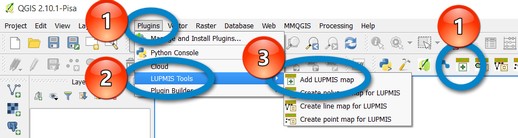
The 'LUPMIS Tools' plugin must be installed (see following chapter). You can call this functionality of adding a map from LUPMIS by Plugins > LUPMIS Tools > Add LUPMIS map. Alternatively, you can use the shortcut from the taskbar (if 'Plugins' is enabled at View > Toolbars), as shown in the image below on the right side.
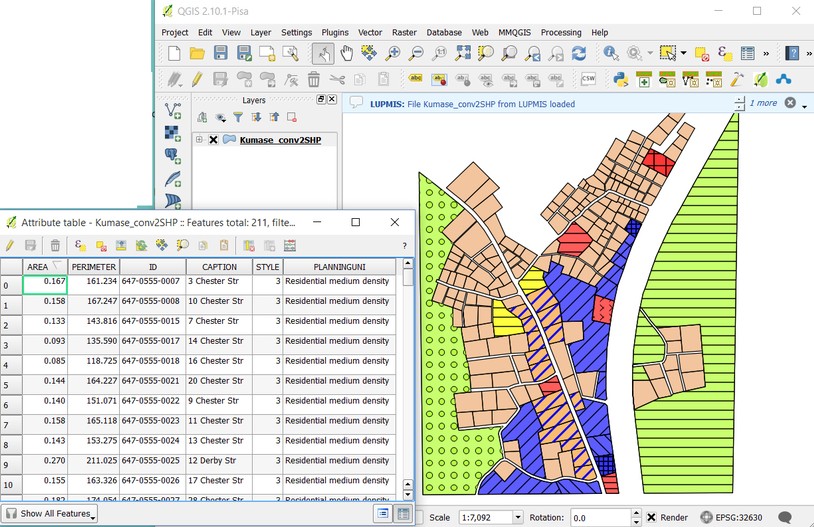
This will add the recently generated map from LUPMIS as a SHP file, including its data fields of id (e.g. UPN), label (e.g. address), style number (e.g. planning zone), planning zone in words (if applicable), projection (PRJ file) and style (if applicable, QML file).
Technical note: The file from the most recent LUPMIS process is identified in file C:\LUPMIS\LUPMISTemp\Temp_addLayer_QGIS.txt. This will be used for the add-map plugin function in QGIS.
- b) Convert selected DRA file in LUPMIS to be added in QGIS (as SHP file), including attributes, style, projection
If you have a single GIS file in LUPMIS / Map Maker, you can select it and it will converted to SHP with all support data and displayed in QGIS by Processing Tools > Format conversion > Vector > Convert DRA to SHP > Single map:

The next menu will let you choose, if styles and planning zone names will also be transferred (in case of plans):
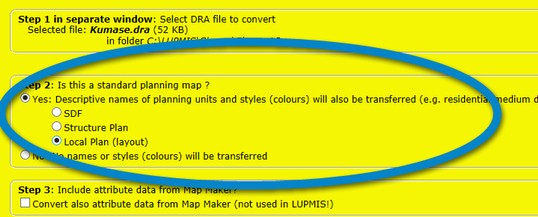
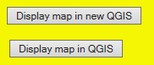
First option displays the selected map in a new QGIS, second option enables the call of this map in an already open QGIS, as described in part (a) above.
If there are too many legend entries in the Legend box in QGIS, use the filter command to reduce ('Filter legend by map content'). 
See also another example for transfer to QGIS: Permit fee due map with amount in attribute file in Chapter 8.5.5.4.
- c) Convert selected DRA file in Map Maker to SHP file format
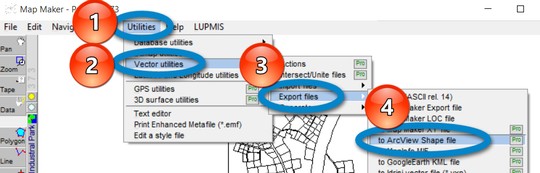
There is also an option in Map Maker to convert a DRA file to SHP format for QGIS: Utilities > Vector utilities > Export files > to ArcView Shape file:
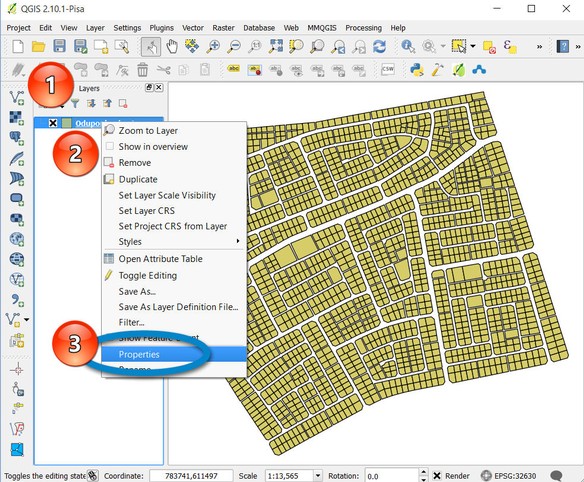
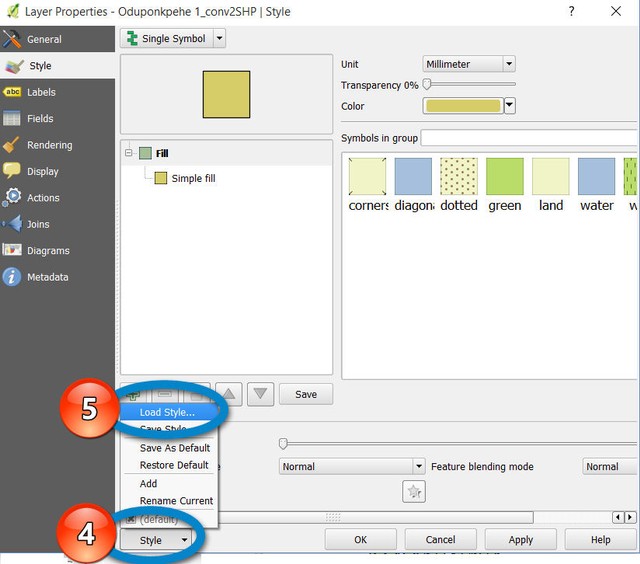
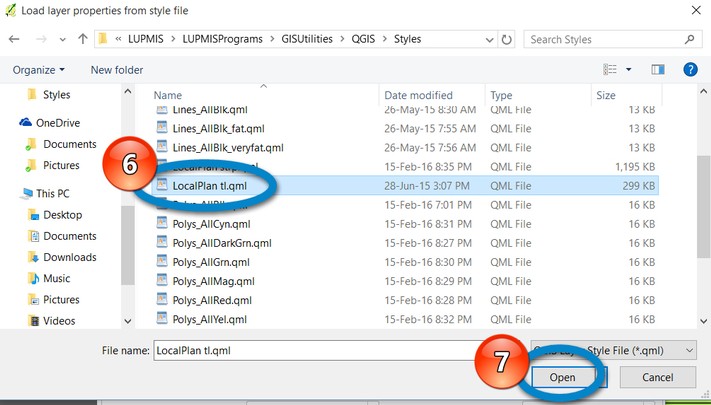
If you have a SHP file from LUPMIS, you can also add the standard colours (styles) to it through: Select added layer > right mouse-click > Properties > Style > Load Style > Select the QML style file you are familiar from Map Maker > Open
- d) Create a layer in QGIS for LUPMIS
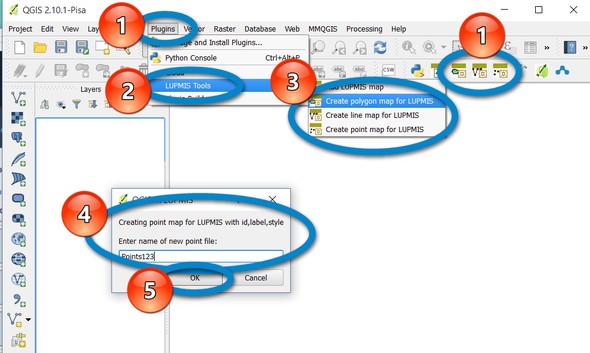
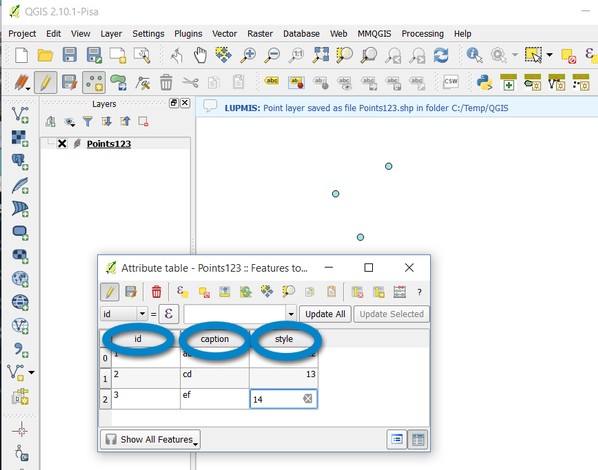
LUPMIS requires the 3 fields of id, label and style for most of its processing. In case, a GIS layer (polygon or line or point file) is set up in QGIS (which is not necessarily the most preferred option), it is better to create such a new layer through the LUPMIS plugin by Plugins > LUPMIS Tools > Create polygon / line / point map for LUPMIS, or alternatively press the shortcut on the taskbar, and enter a name for this new layer:
Don't forget to save regularly, if data are entered.

