8.2.12 Format conversion - LUPMISManual
Main menu:
- 0. Introduction
- 1. GIS handling
-
2. GIS data entry
- 2.1 Create new layer
- 2.2 Digitize line
- 2.3 Digitize point
- 2.4 Digitize polygon
- 2.5 Edit existing layer
- 2.6 Delete feature
- 2.7 Split line
- 2.8 Split polygon
- 2.9 Merge lines from different layers
- 2.10 Unite lines
- 2.11 Snap lines
- 2.12 Join polygons
- 2.13 Extend polygon
- 2.14 Insert island
- 2.15 Define unit surrounding islands
- 2.16 Create 'doughnut'
- 2.17 Fill 'doughnut' polygon
- 2.18 Fill polygon with 'holes'
- 2.19 Digitize parcels from sector layout
-
3. GIS operations
- 3.1 Create buffer
- 3.2 Create exclusion zone
- 3.3 Overlay units
- 3.4 Convert line to polygon
- 3.5 Derive statistics (area size, length)
- 3.6 Clip unit according to other unit
- 3.7 Create geographic grid
- 3.8 Move entire vector map
- 3.9 Move or copy individual features on a map
- 3.10 Adjust polygon to line
- 3.11 Convert points to polygon
- 3.12 Define by distance
- 3.13 Create multiple objects
- 3.14 Transfer styles from one layer to another
-
4. Attribute database
- 4.1 Start with database
- 4.2 Import database
- 4.3 Display database information
- 4.4 Enter attribute data
- 4.5 Attribute matrix of multiple layers
- 4.6 Seeds
- 4.7 Repair attribute data
- 4.8 Merge lines with attached database
- 4.9 Transfer attribute data from points to polygons
- 4.10 Copy styles, labels, attributes
-
5. Conversion of data
-
5.1 Points
- 5.1.1 Import list of points from text file
- 5.1.2 Import list of points from Excel file
- 5.1.3 Convert point coordinates between projections
- 5.1.4 Convert point coordinates from Ghana War Office (feet)
- 5.1.5 Convert point coordinates from Ghana Clark 1880 (feet)
- 5.1.6 Track with GPS
- 5.1.7 Download GPS track from Garmin
- 5.1.8 Download GPS track from PDA
- 5.1.9 Frequency analysis of points
- 5.2 Vector maps
- 5.3 Raster maps
-
5.4 Communication with other GIS programs
- 5.4.1 Import GIS data from SHP format
- 5.4.2 Import GIS data from E00 format
- 5.4.3 Import GIS data from AutoCAD
- 5.4.4 Export LUPMIS data to other programs
- 5.4.5 Export GIS to AutoCAD
- 5.4.6 Change a shape file to GPX
- 5.4.7 Transfer GIS data to other LUPMIS installations
- 5.4.8 Digitize lines in Google Earth
- 5.5 Terrain data
- 5.6 Export to tables
- 5.7 Density map
-
5.1 Points
-
6. Presentation
- 6.1 Labels
- 6.2 Styles and Symbols
- 6.3 Marginalia
- 6.4 Legend
- 6.5 Map template
- 6.6 Final print
- 6.7 Print to file
- 6.8 3D visualization
- 6.9 External display of features
- 6.10 Google
-
7. GIS for land use planning
- 7.1 Introduction to land use planning
- 7.2 Land use mapping for Structure Plan
- 7.3 Detail mapping for Local Plan
- 7.4 Framework
- 7.5 Structure Plan
- 7.6 Local Plan
- 7.7 Follow-up plans from Local Plan
- 7.8 Land evaluation
-
8. LUPMIS Tools
- 8.1 General
- 8.2 Drawing Tools
- 8.3 Printing Tools
- 8.4 Permit Tools
- 8.5 Census Tools
-
8.6 Revenue Tools
- 8.6.1 Overview
- 8.6.2 Entry of revenue data
- 8.6.3 Retrieval of revenue data
- 8.6.4 Revenue maps
- 8.6.5 Other revenue tools
- 8.7 Reports Tools
- 8.8 Project Tools
- 8.9 Settings
-
9. Databases
- 9.1 Permit Database
-
9.2 Plans
- 9.2.1 Accra
- 9.2.2 Kasoa
- 9.2.3 Dodowa
- 9.2.4 Sekondi-Takoradi
- 9.3 Census Database
- 9.4 Revenue Database
- 9.5 Report Database
- 9.6 Project Database
- 9.7 Address Database
-
Annexes 1-10
- A1. LUPMIS setup
- A2. Background to cartography/raster images
- A3. Glosssary
- A4. Troubleshooting
- A5. Styles
- A6. Classification for landuse mapping/planning
- A7. GIS utilities
- A8. Map projection parameters
- A9. Regions / Districts
- A 10. Standards
-
Annexes 11-20
- A11. LUPMIS distribution
- A12. Garmin GPS
- A13. Training
- A14. ArcView
- A15. Population statistics
- A16. Entry and display of survey data
- A17. External exercises
- A18. Programming
- A19. Paper sizes
- A20. Various IT advices
- A21. Site map and references
8. LUPMIS Tools > 8.2 Drawing Tools
8.2.12 Format Conversion
Level of expertise required for this Chapter: Intermediate; specifically for LUPMIS @ TCPD
These Tools covers all the conversion options of vector and raster formats:
- a) Export for Display in OpenStreetMap / Google Maps
This export version of DRA files to Internet-format creates an HTML files for direct display in OpenStreetMaps or in Google Maps: Drawing Tools > Format conversion > Format conversion: Vector > Export for display in OSM / Google. It can convert both DRA and SHP files.
Be aware, the main focus of this Tool is the immediate display. It does not create a KML or GML file. For those conversion, other Tools exist (see below).
Technical remark: It creates a JavaScript part in an HTML file.
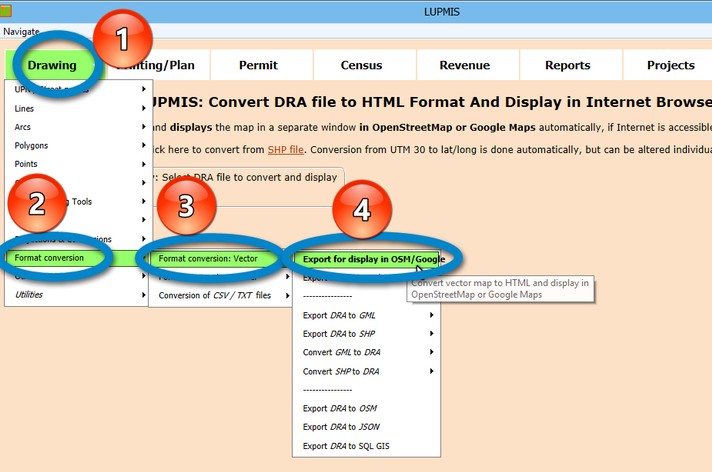
After selecting the DRA file, you carefully specify the type of file (polygon vs line vs point) and of display, see below some examples. The options for color appearances, line widths or point sizes are based on the style number in the DRA file.

Examples of output:


- b) Export DRA to KML / Internet
The most powerful export tool from DRA files to Open-Source format is the Drawing Tool > Format conversion > Format conversion: Vector > Export DRA to KML / Internet:


- c) Export DRA to GML / SHP
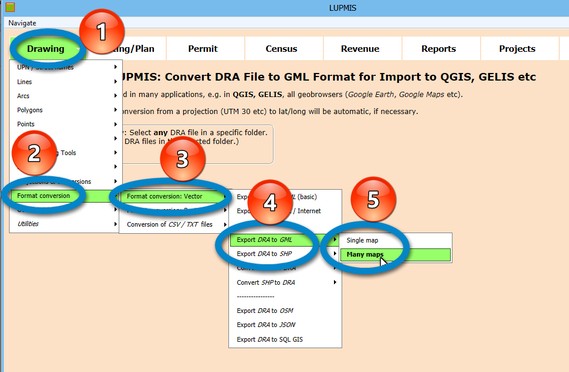
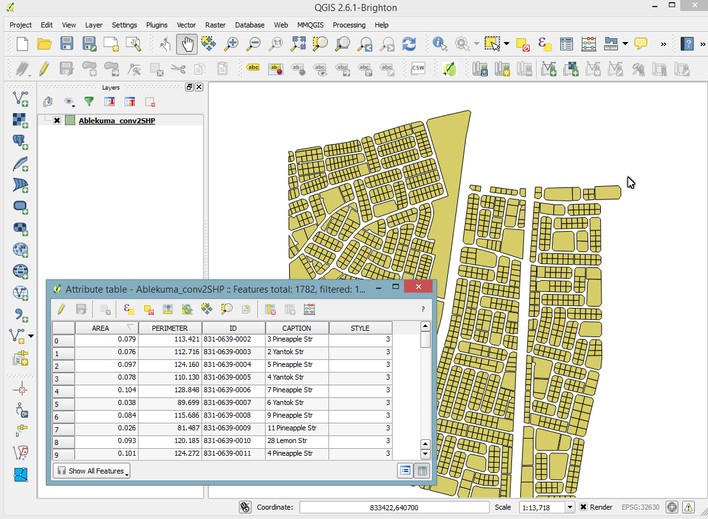
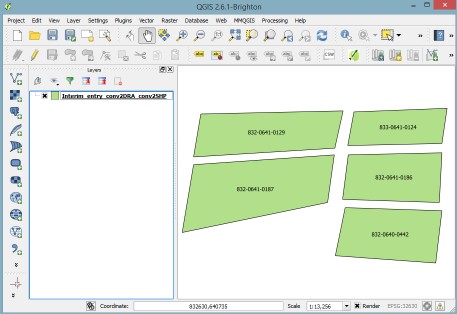
To convert your DRA files of Map Maker to GML format for other GIS applications, such as QGIS, GELIS, etc or to SHP format for ESRI software, use this Drawing Tools > Format conversion > Format conversion: Vector > Export DRA to GML (or SHP) > Single / Many maps.
With the 'Many maps' option you can convert all DRA files in the selected folder. Just pick any DRA file in a folder, and it will convert all DRA files of that folder.

- d) Convert GML / SHP to DRA
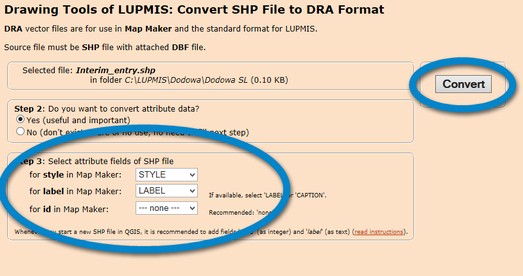
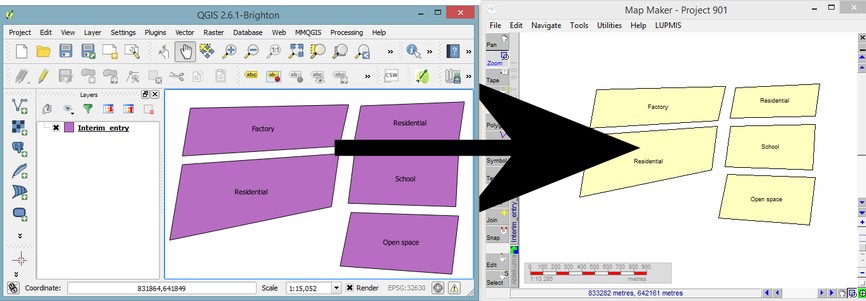
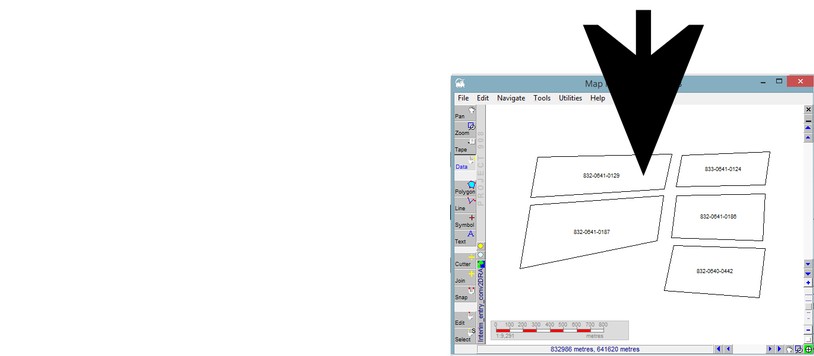
Similar to the process above, this Tool converts all GML (or SHP) files of other applications to DRA file for use in Map Maker: Drawing Tools > Format conversion > Format conversion: Vector > Convert GML (or SHP) to DRA > Single / Many maps.
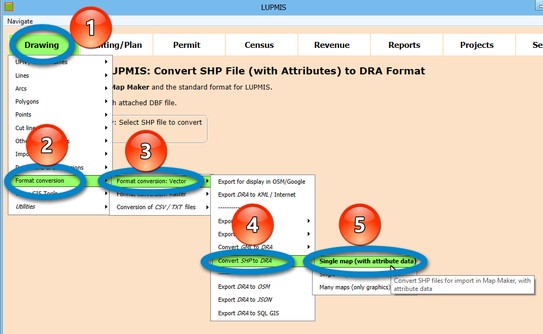
Recommended:
- e) Export DRA to OSM / JSON
- e) Convert Raster
- f) Export CSV / TXT to KML / Internet

