8.6.2.5 Fee-fixing - LUPMISManual
Main menu:
- 0. Introduction
- 1. GIS handling
-
2. GIS data entry
- 2.1 Create new layer
- 2.2 Digitize line
- 2.3 Digitize point
- 2.4 Digitize polygon
- 2.5 Edit existing layer
- 2.6 Delete feature
- 2.7 Split line
- 2.8 Split polygon
- 2.9 Merge lines from different layers
- 2.10 Unite lines
- 2.11 Snap lines
- 2.12 Join polygons
- 2.13 Extend polygon
- 2.14 Insert island
- 2.15 Define unit surrounding islands
- 2.16 Create 'doughnut'
- 2.17 Fill 'doughnut' polygon
- 2.18 Fill polygon with 'holes'
- 2.19 Digitize parcels from sector layout
-
3. GIS operations
- 3.1 Create buffer
- 3.2 Create exclusion zone
- 3.3 Overlay units
- 3.4 Convert line to polygon
- 3.5 Derive statistics (area size, length)
- 3.6 Clip unit according to other unit
- 3.7 Create geographic grid
- 3.8 Move entire vector map
- 3.9 Move or copy individual features on a map
- 3.10 Adjust polygon to line
- 3.11 Convert points to polygon
- 3.12 Define by distance
- 3.13 Create multiple objects
- 3.14 Transfer styles from one layer to another
-
4. Attribute database
- 4.1 Start with database
- 4.2 Import database
- 4.3 Display database information
- 4.4 Enter attribute data
- 4.5 Attribute matrix of multiple layers
- 4.6 Seeds
- 4.7 Repair attribute data
- 4.8 Merge lines with attached database
- 4.9 Transfer attribute data from points to polygons
- 4.10 Copy styles, labels, attributes
-
5. Conversion of data
-
5.1 Points
- 5.1.1 Import list of points from text file
- 5.1.2 Import list of points from Excel file
- 5.1.3 Convert point coordinates between projections
- 5.1.4 Convert point coordinates from Ghana War Office (feet)
- 5.1.5 Convert point coordinates from Ghana Clark 1880 (feet)
- 5.1.6 Track with GPS
- 5.1.7 Download GPS track from Garmin
- 5.1.8 Download GPS track from PDA
- 5.1.9 Frequency analysis of points
- 5.2 Vector maps
- 5.3 Raster maps
-
5.4 Communication with other GIS programs
- 5.4.1 Import GIS data from SHP format
- 5.4.2 Import GIS data from E00 format
- 5.4.3 Import GIS data from AutoCAD
- 5.4.4 Export LUPMIS data to other programs
- 5.4.5 Export GIS to AutoCAD
- 5.4.6 Change a shape file to GPX
- 5.4.7 Transfer GIS data to other LUPMIS installations
- 5.4.8 Digitize lines in Google Earth
- 5.5 Terrain data
- 5.6 Export to tables
- 5.7 Density map
-
5.1 Points
-
6. Presentation
- 6.1 Labels
- 6.2 Styles and Symbols
- 6.3 Marginalia
- 6.4 Legend
- 6.5 Map template
- 6.6 Final print
- 6.7 Print to file
- 6.8 3D visualization
- 6.9 External display of features
- 6.10 Google
-
7. GIS for land use planning
- 7.1 Introduction to land use planning
- 7.2 Land use mapping for Structure Plan
- 7.3 Detail mapping for Local Plan
- 7.4 Framework
- 7.5 Structure Plan
- 7.6 Local Plan
- 7.7 Follow-up plans from Local Plan
- 7.8 Land evaluation
-
8. LUPMIS Tools
- 8.1 General
- 8.2 Drawing Tools
- 8.3 Printing Tools
- 8.4 Permit Tools
- 8.5 Census Tools
-
8.6 Revenue Tools
- 8.6.1 Overview
- 8.6.2 Entry of revenue data
- 8.6.3 Retrieval of revenue data
- 8.6.4 Revenue maps
- 8.6.5 Other Revenue Tools
- 8.7 Reports Tools
- 8.8 Project Tools
- 8.9 Settings
-
9. Databases
- 9.1 Permit Database
-
9.2 Plans
- 9.2.1 Accra
- 9.2.2 Kasoa
- 9.2.3 Dodowa
- 9.2.4 Sekondi-Takoradi
- 9.3 Census Database
- 9.4 Revenue Database
- 9.5 Report Database
- 9.6 Project Database
-
Annexes 1-10
- A1. LUPMIS setup
- A2. Background to cartography/raster images
- A3. Glosssary
- A4. Troubleshooting
- A5. Styles
- A6. Classification for landuse mapping/planning
- A7. GIS utilities
- A8. Map projection parameters
- A9. Regions / Districts
- A 10. Standards
-
Annexes 11-20
- A11. LUPMIS distribution
- A12. Garmin GPS
- A13. Training
- A14. ArcView
- A15. Population statistics
- A16. Entry and display of survey data
- A17. External exercises
- A18. Programming
- A19. Paper sizes
- A20. Various IT advices
- A21. Site map and references
Level of expertise required for this Chapter: Intermediate; specifically for LUPMIS @ TCPD
After all data have been entered, as explained in the previous Chapters, the annual revenue have to be calculated for all properties / businesses (also called 'fee-fixing').
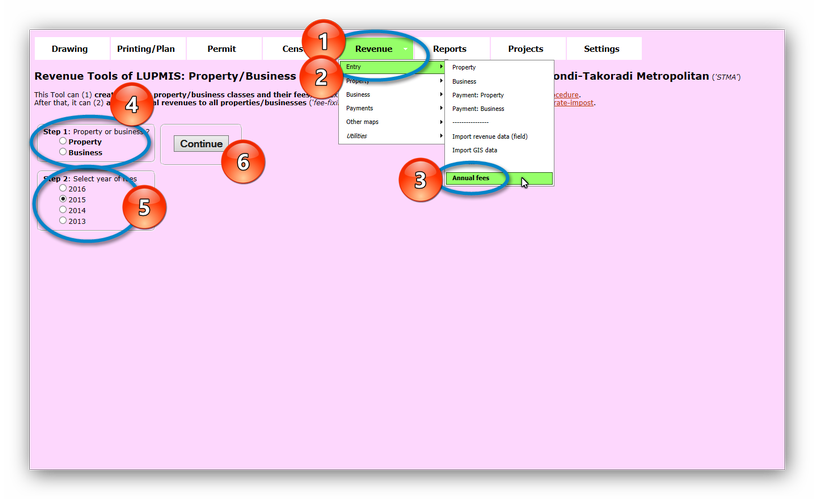
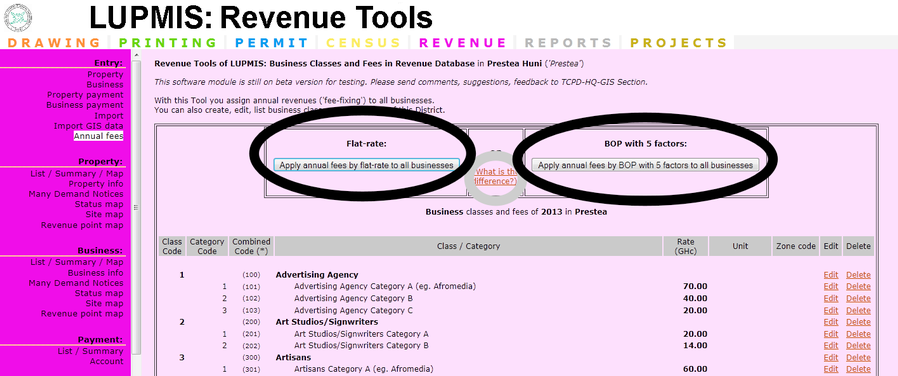
There are two ways, both to calculate the fee of properties and of businesses. Accordingly, the minimum data set to be imported is different.
A) For property fees:
Flat-rate:
This is based on a fixed rate for each property type (or 'property use'), which is defined by the Assembly for each 'property use' in GHc.
Data required are the classes and 'property category' and their 'rates' (imported through Revenue Tool Annual Fees > Import fees from file) and the 'property use' code (usually a code such as 101, 102 or similar) of all properties (imported through Revenue Tool Import > Property data). Each property must have a 'property use' code (usually a code such as 101, 102 or similar).
Example: Each residential property of class A (can be coded in LUPMIS as 101) is rated by the Assembly with GHc 15.00 per year. Property 678-0789-0012, which is in this class 101, has a revenue of GHc 15.00.
Rate-impost:
This is based on the revenue income, as expected by the Assembly, and on the property value of each individual property, as assessed by the Land Valuation (Board).
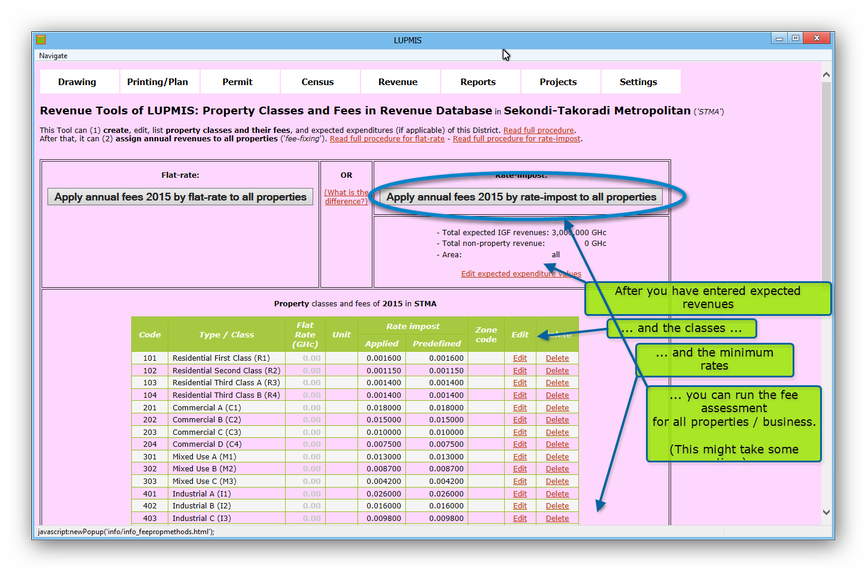
Data required are the total expected expenditure, the non-property revenue and the area of revenue expectation, which is either for the entire District (enter 'all') or only for a specific Sector (Local Plan, enter name of the Local Plan) (imported through Revenue Tool Annual Fee > Properties > Fixed values).
Additional required data are the 'property use' code (usually a code such as 101, 102 or similar) of all properties (imported through Revenue Tool Import > Property data), and the property values (in GHc) of all properties (imported through Revenue Tool Import > Property values). These two steps can be combined, if the property values are in the property data file.
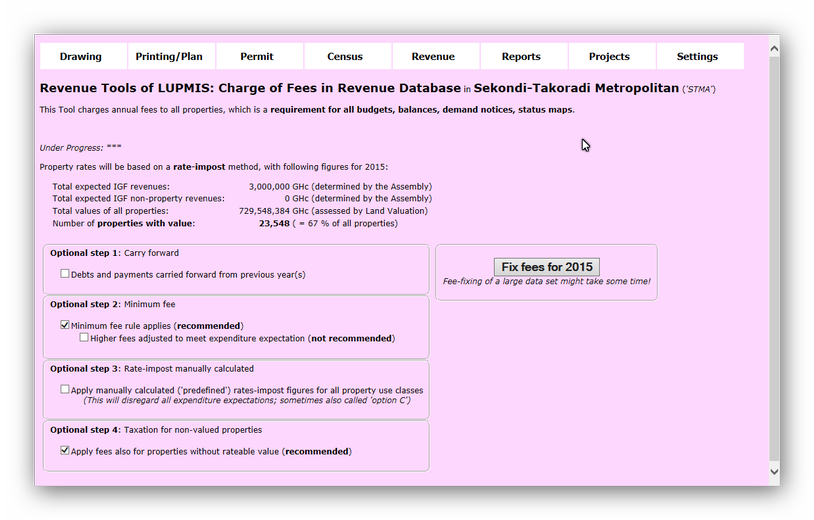
LUPMIS will automatically calculate: First, division of the expected property revenue by the total of all property values to come up with the rate-impost factor for all properties. Then, for each property code (e.g. 101, 102 etc): Calculation of the total of all property values, multiplication of this total with the rate-impost for all (from previous step), and division by the property value of all properties. This will create an 'unmodified rate-impost factor' for each property code. As this will not add up to the requested total expected property revenue, it has to be modified in form of a multiplication factor. With this 'modified rate-impost factor' all property values will be multiplied to assign the final revenue.
The rate-impost factor will be displayed for each property category. The system will use this factor ('modified rate-impost factor') for calculation of all properties.
Example: The Assembly determines 21,000,000 GHc as the total expected expenditure, 20,000,000 GHc as the non-property revenue, for the entire District ('all'). Property 678-0789-0012 has property use 102 ('residential class B') and a value of 15,000 GHc. This results in a rate-impost factor of xxxxxxxxxx and a revenue of xxxxxxxxxxxx GHc.
A technical description of the difference is accessible in the 'OR' column ('What is the difference?').
- - - - -
B) For business fees:
Flat-rate:
This is based on a fixed rate for each business type, which is defined by the Assembly for each 'business category' in GHc.
Example: Hairdresser (can be coded in LUPMIS as 1701) is rated by the Assembly with GHc 50.00 per year. Business 678-0789-0045 has code 1701, i.e. is a hairdresser. The revenue for this business will be GHc 50.
BOP 'Business Operation Permit', with 5 factors:
This is based on the same business category and rate as in method above, but with the addition of 5 factors:
- Location: Prime / good / fair
- Number of permanent employees: 0-10 / 11-20 / 21-30 / 31-40 / > 40
- Impact on environment: No / light / medium / heavy pollution
- Type of business office operations: Main office / area office / branch office / agency
- Nature of the business enterprises: International / national / local
In addition to the same data required for the method above, it is also necessary to enter the percentage figures for location, number of employees, impact on environment, business office operation, business operations of all business through Revenue Tool Import > Business data.
LUPMIS will automatically add to the base revenue the sum of all 5 factor percentages (sum of all 5 factors / 100, multiplied with the base revenue, added to the base revenue).
Example: The hairdresser above (LUPMIS code 1701, rated as 50.00 GHc per year) is assessed with 100 for good location, 20 for 1-10 employees, 80 for medium pollution, 40 for agency, 40 for local enterprise. This totals to 280, then divided by 100: 280 / 100 = 2.8, then * 50 = 140. The fee is 50 + 140 = 190 GHc.