LUPMIS - GIS User Manual for Land Use Planning
Main menu:
- Home Page
- 0. Rationale
- 1. GIS handling
- 2. GIS data entry
- 2.1 Create new layer
- 2.2 Digitize line
- 2.3 Digitize point
- 2.4 Digitize polygon
- 2.5 Edit existing layer
- 2.6 Delete feature
- 2.7 Split line
- 2.8 Split polygon
- 2.9 Merge lines from different layers
- 2.10 Unite lines
- 2.11 Snap lines
- 2.12 Join polygons
- 2.13 Extend polygon
- 2.14 Insert island
- 2.15 Define unit surrounding islands
- 2.16 Create 'doughnut'
- 2.17 Fill 'doughnut' polygon
- 2.18 Fill polygon with 'holes'
- 2.19 Digitize parcels from sector layout
- 3. GIS operations
- 3.1 Create buffer
- 3.2 Create exclusion zone
- 3.3 Overlay units
- 3.4 Convert line to polygon
- 3.5 Derive statistics (area size, length)
- 3.6 Clip unit according to other unit
- 3.7 Create geographic grid
- 3.8 Move entire vector map
- 3.9 Move or copy individual features on a map
- 3.10 Adjust polygon to line
- 3.11 Convert points to polygon
- 3.12 Define by distance
- 3.13 Create multiple objects
- 4. Attribute database
- 4.1 Start with database
- 4.2 Import database
- 4.3 Display database information
- 4.4 Enter attribute data
- 4.5 Attribute matrix of multiple layers
- 4.6 Seeds
- 4.7 Repair attribute data
- 4.8 Merge lines with attached database
- 4.9 Transfer attribute data from points to polygons
- 4.10 Copy styles, labels, attributes
- 5. Conversion of data
- 5.1 Points
- 5.1.1 Import list of points from text file
- 5.1.2 Import list of points from Excel file
- 5.1.3 Convert point coordinates between projections
- 5.1.4 Convert point coordinates from Ghana War Office (feet)
- 5.1.5 Convert point coordinates from Ghana Clark 1880 (feet)
- 5.1.6 Track with GPS
- 5.1.7 Download GPS track from Garmin
- 5.1.8 Download GPS track from PDA
- 5.2 Vector maps
- 5.3 Raster maps
- 5.4 Communication with other GIS programs
- 5.4.1 Import GIS data from SHP format
- 5.4.2 Import GIS data from E00 format
- 5.4.3 Import GIS data from AutoCAD
- 5.4.4 Export LUPMIS data to other programs
- 5.4.5 Export GIS to AutoCAD
- 5.4.6 Change a shape file to GPX
- 5.4.7 Transfer GIS data to other LUPMIS installations
- 5.4.8 Digitize lines in Google Earth
- 5.5 Drawing Tools
- 5.6 Terrain data
- 5.1 Points
- 6. Presentation
- 7. GIS for land use planning
- 8. Database
- Annexes
- A1. Map Maker setup
- A2. Background to cartography and raster images
- A3. Glosssary
- A4. Troubleshooting
- A5. Styles
- A6. Classification for land use mapping and planning
- A7. GIS utilities
- A8. Map projection parameters
- A9. Maps in pilot areas
- A10.Standards
- A11. LUPMIS distribution CD
- A12. Garmin GPS
- A13. Training
- A14. ArcView
- A15. Population statistics
- A16. Entry and display of survey data
- A17. External exercises
- A18. MS Access
- A19. Paper sizes
- A20. Site map and references
6.10.1 Overview
6. Presentation > 6.10 Printing Tools
6.10 Printing Tools
6.10.1 Overview
Level of expertise required for this Chapter: Beginner; specifically for LUPMIS @ TCPD

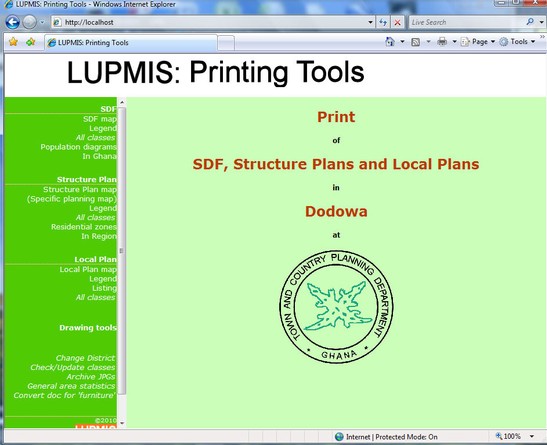
For standardized, easy production of planning maps, the 'Printing Tools' have been developed at LUPMIS. They are a set of utilities, using LUPMIS maps and data, and form an 'add-on' (extension) to the GIS. You can go to the 'LUPMIS Tools' here (if installed locally through the InstallationCD).
Like all the 'LUPMIS Tools' (' Drawing Tools', ' Permit Tools' , ' Census Tools' ), they are not part of the standard Map Maker software, but customizations for the needs of TCPD and land use planning in Ghana.
Note: Technically, they are programmed in php to satisfy future requests on webbased migration of GIS services. It uses MMmacro and GIS file import and export features of Map Maker (loc, xy, mme, ptp, geo files, see also Annex 18.5).
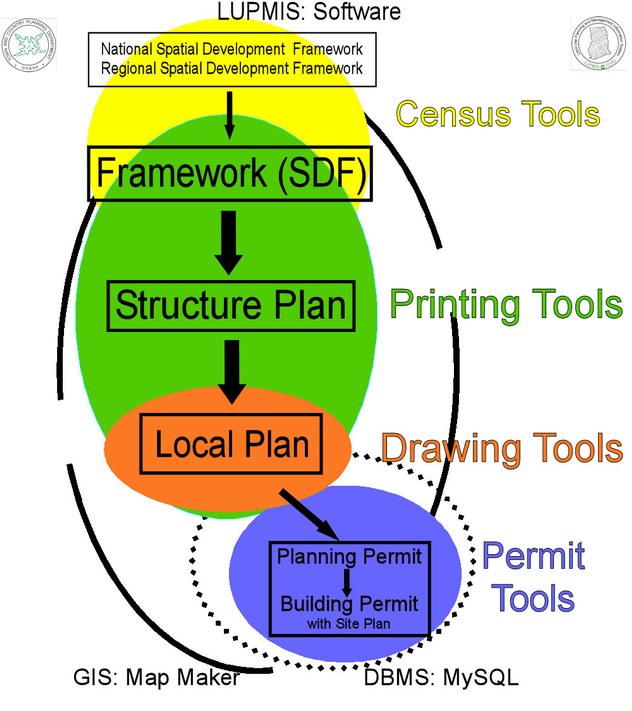
Integration of 'LUPMIS Tools' in the 3-tier land use planning system shows following chart:
How to start the 'LUPMIS Tools'?
1. Start Map Maker. It has to run in the background.
2. Start Xampp (as installed from the 'InstallationCD') > Start Apache > Start MySQL. You can then close the Xampp Control Panel.
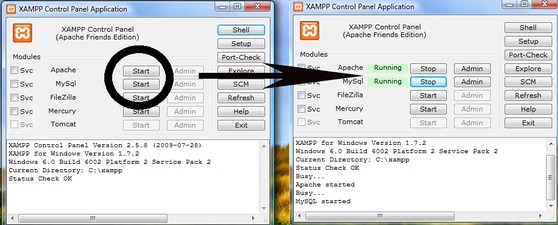
3. Start the 'LUPMIS Tools' from the installed LUPMIS icon at your desktop:

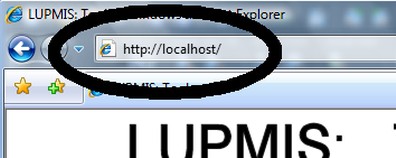
Alternatively, at your internet browser (e.g. Internet Explorer), type the address 'http:/localhost/'.
For the installation of the 'LUPMIS Tools' see Annex 1.1.1.
For training questions, see end of Annex 13.2.


Sub-Menu:
- 6.10.1 Overview ←
- 6.10.2 Maps
- 6.10.3 Legends
- 6.10.4 Population diagrams
- 6.10.5 Other tools