LUPMIS - GIS User Manual for Land Use Planning
Main menu:
- Home Page
- 0. Rationale
- 1. GIS handling
- 2. GIS data entry
- 2.1 Create new layer
- 2.2 Digitize line
- 2.3 Digitize point
- 2.4 Digitize polygon
- 2.5 Edit existing layer
- 2.6 Delete feature
- 2.7 Split line
- 2.8 Split polygon
- 2.9 Merge lines from different layers
- 2.10 Unite lines
- 2.11 Snap lines
- 2.12 Join polygons
- 2.13 Extend polygon
- 2.14 Insert island
- 2.15 Define unit surrounding islands
- 2.16 Create 'doughnut'
- 2.17 Fill 'doughnut' polygon
- 2.18 Fill polygon with 'holes'
- 2.19 Digitize parcels from sector layout
- 3. GIS operations
- 3.1 Create buffer
- 3.2 Create exclusion zone
- 3.3 Overlay units
- 3.4 Convert line to polygon
- 3.5 Derive statistics (area size, length)
- 3.6 Clip unit according to other unit
- 3.7 Create geographic grid
- 3.8 Move entire vector map
- 3.9 Move or copy individual features on a map
- 3.10 Adjust polygon to line
- 3.11 Convert points to polygon
- 3.12 Define by distance
- 3.13 Create multiple objects
- 3.14 Transfer styles from one layer to another
- 4. Attribute database
- 4.1 Start with database
- 4.2 Import database
- 4.3 Display database information
- 4.4 Enter attribute data
- 4.5 Attribute matrix of multiple layers
- 4.6 Seeds
- 4.7 Repair attribute data
- 4.8 Merge lines with attached database
- 4.9 Transfer attribute data from points to polygons
- 4.10 Copy styles, labels, attributes
- 5. Conversion of data
- 5.1 Points
- 5.1.1 Import list of points from text file
- 5.1.2 Import list of points from Excel file
- 5.1.3 Convert point coordinates between projections
- 5.1.4 Convert point coordinates from Ghana War Office (feet)
- 5.1.5 Convert point coordinates from Ghana Clark 1880 (feet)
- 5.1.6 Track with GPS
- 5.1.7 Download GPS track from Garmin
- 5.1.8 Download GPS track from PDA
- 5.2 Vector maps
- 5.3 Raster maps
- 5.3.1 Import raster map from external source
- 5.3.2 Quality-check raster file
- 5.3.3 Georeference scanned map
- 5.3.4 Re-georeference image
- 5.3.5 Load sector layout map
- 5.3.6 Shift raster map
- 5.3.7 Download Google Earth image
- 5.3.8 Clipping and masking images
- 5.3.9 Enhance georeferenced image
- 5.3.10 Batch-convert raster images
- 5.4 Communication with other GIS programs
- 5.4.1 Import GIS data from SHP format
- 5.4.2 Import GIS data from E00 format
- 5.4.3 Import GIS data from AutoCAD
- 5.4.4 Export LUPMIS data to other programs
- 5.4.5 Export GIS to AutoCAD
- 5.4.6 Change a shape file to GPX
- 5.4.7 Transfer GIS data to other LUPMIS installations
- 5.4.8 Digitize lines in Google Earth
- 5.5 Terrain data
- 5.1 Points
- 6. Presentation
- 7. GIS for land use planning
- 8. LUPMIS Tools
- 9. Databases
- Annexes
- A1. Map Maker setup
- A2. Background to cartography and raster images
- A3. Glosssary
- A4. Troubleshooting
- A5. Styles
- A6. Classification for land use mapping and planning
- A7. GIS utilities
- A8. Map projection parameters
- A9. Maps in pilot areas
- A10.Standards
- A11. LUPMIS distribution CD
- A12. Garmin GPS
- A13. Training
- A14. ArcView
- A15. Population statistics
- A16. Entry and display of survey data
- A17. External exercises
- A18. Programming
- A19. Paper sizes
- A20. Various IT advices
- A21. Site map and references
8.3.5 Other Printing Tools
8. LUPMIS Tools > 8.3 Printing Tools
8.3.5 Other Printing Tools
Level of expertise required for this Chapter: Beginner; specifically for LUPMIS @ TCPD
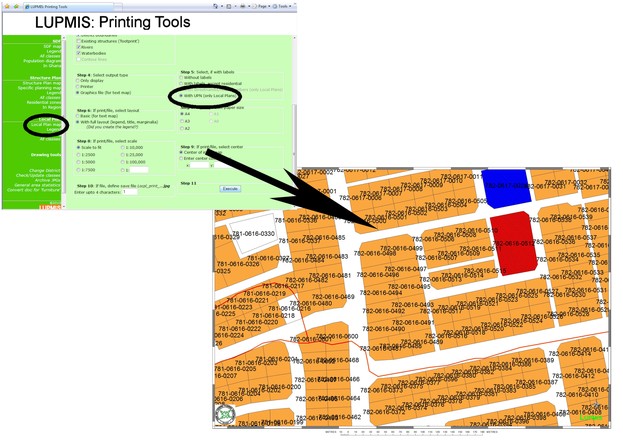
8.3.5.1 UPN Map
8.3.5.2 Check / Update Classes
This function lets you check, if the classification of planning zones is updated and follows the most recent standard (see land use classification of Structure Plans or of Local Plans).
Technical note 1: Subfolders called 'Non-LUPMIS', 'Old', 'Temp' or 'Work' are not considered.
8.3.5.3 Archive JPGs
Two index files 'Topo_minmax.txt' and 'Photo_minmax.txt' are required to have all information of images, to allow correct selection and placing of raster files (including orthophotomaps, satellite images, scanned topographical maps, but only JPG files).
These can be automatically created through this tool. If no raster files are added to the system, there is no need to run this function.
Technical note 2: Subfolders which are called 'Additional', 'Non-LUPMIS', 'Old', 'Temp' or 'Work' are not considered. Thus, if you have any orthophotomaps, which you don't want to be called by the Printing Tools (for example, outdated ones), move them to folder 'Non-LUPMIS' or 'Old'.
Technical note 3: This text file can also be produced or edited manually. Each line consists of one JPG definition. Syntax for each JPG file is:
tt,xxxxxx,yyyyyyy,XXXXXX,YYYYYYY,file
where:
- tt = type (TT for topo, PV for photo very low resolution, PL for photo low resolution, PM for photo medium resolution, PH for photo high resolution)
- xxxxxx = minimum x (UTM, 6 digits)
- yyyyyyy = minimum y (UTM, 7 digits)
- XXXXXX = maximum x (UTM, 6 digits)
- YYYYYYY = maximum y (UTM, 7 digits)
- file includes path and extension
For example: TT,665455,0746456,693879,0774738,C:/LUPMIS/Ejisu/Ejisu topo/EjisuNE_topo50.jpg
JPG Files, which are not listed in this ....minmax.txt file, are not considered at the Printing Tools. They should not overlap each other.
-- More to come soon--


Sub-Menu:
- 8.3.1 Overview
- 8.3.2 Maps
- 8.3.3 Legends
- 8.3.4 Population diagrams
- 8.3.5 Other Printing Tools ←