
7. Further Institutional Aspects
7.1 Standardization
ILUD Standards
If data are not standardized, uniquely structured and catalogued with their metadata, there will be the situation of ‘having an ocean of data, but only drops of information’. It is important to guarantee that all GIS data are in a well structured, transparent system.
A standardized information system was established nationwide. The main goal was to avoid that staff in the many offices of BPN (more than 400) would develop their own ideas up to that point that in every office different codes and different data 'systems' will be used. It even has happened that in the same office, from operator A to operator B, no exchange of data was possible! This had to be prevented by any means!
Any information system has to define in an early stage, how the coding will be done. A data dictionary has to be defined and agreed on. Every staff member has to follow these rules: Either by order of the supervisors and of the senior management, and/or by software. |
Therefore, a complete set of data standards (‘Technical specs’) with definitions on:
has been defined and used.
All data entry and processing operations follow the same procedures (i.e. the concept), have the same coding (e.g. land use classification codes, road classification codes etc.), follow the same file naming syntax, have the same file structure in each component, geographical references are unique, their map sheet numbering system is structured and geometric, etc.
All this is 'transparent': Any data user and data owner of BPN / ILUD data can have a look at these standards and conventions. They are documented in software manuals, guidelines, training manuals, and are available electronically anytime by anybody through the Internet (http://www.geocities.com/Tokyo/2439/).
The land use classification, as the core of the data dictionary, is a hierarchical, structural classification system, which can be extended for larger scales, i.e. at urban areas, and which has been defined to satisfy the requests of future users. It contains:
At a first glance, this classification seems to be rather detailed. This is due to the scale (maximum mapping scale 1:25,000) and the purpose (the need!) to use these data for land use planning.
One remark on the classification: While it is important to have a standard classification that users are familiar with and can work with, it does not mean that a GIS has to rely solely on those classes. In ILUD, there is an extended textual ‘attribute’ database (DBMS) behind the classification and behind the standard map display. This will become more important in future, when more specific requests will be made for specific land use mapping features, such as query requests for display or statistics for one specific land use type.
These 'attribute' data are stored in dBase dbf files, and are processed by Clipper exe routines. |
7.2 Software for user interface
Many GIS software packages are overloaded with functions, which makes them powerful at one side, but dangerous on the other side for the institutionalization by an agency. Staff will be inclined to ‘play around’ with too many functions, and loose the view on their task!
It can easily happen, that people are 'dragged away' by all the nice, but rather useless pictures on-screen in true colors and with high resolution, at the 'state of art'.
The above mentioned concept and standards can only be guaranteed by introduction of a user interface. All operators follow a well-established sequence in their tasks of data entry, processing and retrieval. The rather complex chart of the concept comes down to an easy-to-follow, step-by-step routine (see Tab.1,3,5).
|
A streamlining of the procedures is necessary in an implementation and production scheme. |
Introduction of an easy, user-friendly interface was a 'must' to establish a GIS in a huge organization with decentralized structure, but request for a nationwide unique technical approach. In the described project, there was no alternative to the full software ('user interface') environment, often described as 'application development'.
A software interface was developed, with restrictions to the necessary, essential functions, to guide object-oriented through the process - and the various software.
Beside the ‘stream-lining’ effect, the user interface had to be most user-friendly. As assessed earlier as a precondition of the project (Part 4), the system has to be applicable ‘on ease’ by the staff.
The only menu options to be answered are of general nature, which can be understood by the staff easily after a short introduction to the system - questions such as which year, which province, which printer, with or without annotations on the plotted map, which generalization level etc. (see following Figs. 8-10).
One advantage of such a system is the low training requirement of staff. Training had to be given to:
|
An early 'human resource assessment' is essential in every project to define the level of process execution. The most important aspects at the HRA are:
|
Fig.9: Sample Screen for Data Entry to GIS (Digitization)
Fig.10: Sample Screens for Data Retrieval
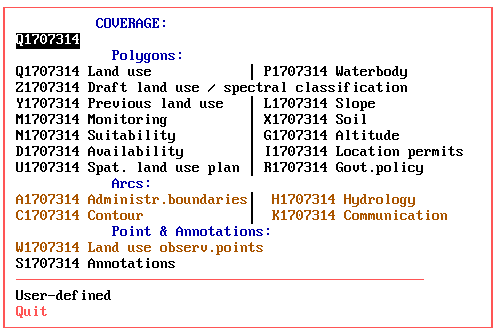
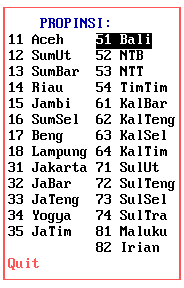
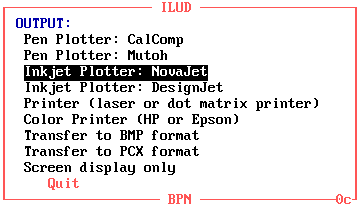
In total, 19 modules have been developed. Most of them are mentioned earlier in Parts 5 and 6. These ILUD modules run on DOS, Windows 3.x, Windows 95. Many of them include internal error trapping routines.
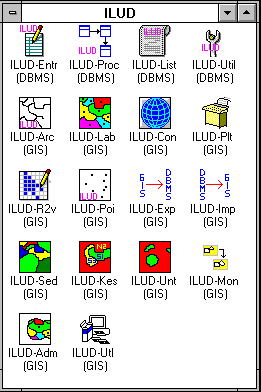
To give an idea of the magnitude of the user interface software: Presently, 1853 kB of source codes for the GIS (sml files), 1117 kB of source codes for the DBMS (prg files), 11 kB of other source codes (Pascal, DOS batches, Lotus macros), 829 kB auxiliary data files have been developed. This is equivalent to some 1800 pages. Programs have been distributed only in compiled form (Clipper compiler for DBMS to generate exe file, pseudo ArcInfo compiler to generate cml/cmx files) for two reasons:
The entire software fits compressed on three floppy disks (two for GIS, one for DBMS). |
The success showed that all maps which have been compiled by the ILUD software (interfaces on top of Arc/Info and dBase IV) are structurally good, follow the same data coding, can be exchanged easily and fulfill data quality standards.
7.3 Standard output
It is important that data which have been collected and entered in a database, can be retrieved and transferred (or displayed or printed) in an easy and particularly standardized way!
Only when an information system can supply the data in the way as requested by the users of the data is the system justified. If, for example, the user wants to have a look at the hardcopy map for orientation only, he can be supplied with a hardcopy map. If the user wants to further process the data digitally, he can be supplied with the GIS digital data (coverage).
As of 1998 the most common output formats are:
To offer a wide variability of outputs for the customer, the GIS is recommended to produce output in (at least) those two formats! |
The project has a standard layout for hardcopy map production at the scales of 1:25,000, 1:50,000 and 1:100,000 at DIN A0 size, following the national map grid index.
Digital outputs of the project’s mapping are various graphics formats such as BMP, PCX or PLT files, or the original data in their coverage, xBase, GIS file formats.
Beside the 'standard' output maps of land use and land use plans, the system is capable to respond on special requests, such as:
Ease of backup is another important issue and important for operationality of GIS applications: For complete and easy transfer of collected data, a software-guided creation of data copy sets is possible: Through a few menu-driven keystrokes, the operator makes a full copy of the original data, which at the user's side can be 'imported' through an ILUD routine, or through standard commercial software (e.g. Pkzip, dBase, DOS, Arc/Info etc.).
7.4 Marketing strategy and PR
‘Information not used is information better not collected!'
To enable potential clients to make use of these maps and to integrate this information in their planning efforts, they have to be aware of the data and all facilities.
Various activities, intentions and plans for such ‘public relation’ work have been set up in the project:
The most global PR system is the Internet. An unofficial homepage (
http://www.geocities.com/Tokyo/2439/) has been set up, which shows the data progress achieved, the facilities of the system, the technical specs and options to contact the agency for data and technical advise.Metadata are given to the National Mapping Agency of Indonesia in regular intervals. They incorporate these metafiles in their national map catalogue. A policy of distributing and/or selling data is in the process of being defined. Cost assessments to define a ‘service fee’ have been calculated. 7.5 Quality Control Quality Control is very important, if data are made public to clients - or sold - and if actual use (here: land use planning and monitoring) is made of the data. The user has to know, with which reliability level he can use the data. In the described project, quality control is understood in two stages: While the first aspect has been described in the project in form of manuals and applied through on-the-job training, the latter has so far only been preliminary defined for land use mapping.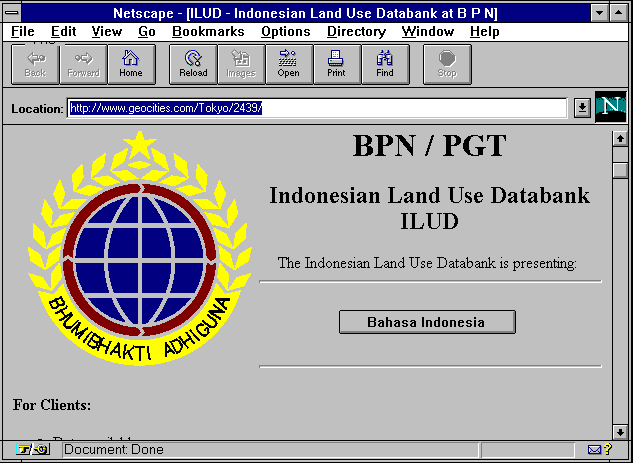

 Next chapter