Remarks on the study and the study author
This GIS case study documentation has been compiled for the framework of the activities of GTZ's 'Working Group GIS'. The study is based on authentic data and actual implementation.
The author of this case study has been directly involved in the establishment of the GIS described in this Paper. The project is carried out by GTZ since mid-1993. Contributions to the GIS of the project were given by all consultant team members and BPN staff, Indonesia. More details about the project can be found in Part 4 of this Paper.
The author has been working for 15 years in land evaluation and set-up of national information systems. His contributions to the development of land evaluation at FAO have been applied in many countries. He is the founder of an on-line information system at ADAC (Germany) and the founder and developer of GILES (FAO) and JOSCIS (one of the largest one-concept soil databases in the world, SSLRC). Before Indonesia, he was on long-term assignments to Brazil, Ethiopia, Jordan. His educational background is geography, land evaluation, and computer sciences.
The author welcomes any comments on this case study documentation. For comments or questions he can be contacted by:
|
e-mail: phone |
mail@GerhardBechtold.com |
Table of Contents
PART I: BACKGROUND INFORMATION
| 1. | Background and Objective of the Documentation |
| 2. | Project Objectives |
| 3. | Institutional Context of the GIS |
| 4. | Project Setup |
PART II: APPLICATION
| 5. | Concept |
| 6. | Methodology and Techniques: Land Use Mapping |
| 7. | Methodology and Techniques: Spatial Land Use Management Plan (Land Allocations) |
| 8. | Further Institutional Aspects |
PART III: EVALUATION AND OUTLOOK
| 9. | Concluding Evaluation and Outlook on Future Development |
APPENDICES
1. Background and Objective of the Documentation During the last few years Geographic Information Systems have more and more become common planning and management tools in technical co-operation projects. Also within the framework of GTZ-supported technical co-operation GIS is meanwhile being used by a large number of projects and for various different purposes. General recommendations for the introduction and operation of GIS in technical co-operation projects as well as brief descriptions of project-specific applications are documented in the GTZ-Guideline 'Geographic Information Systems - Application in Technical Co-operation Projects'. The German version of these guidelines was published in 1994, the English version in 1996. First training courses on the potential of GIS in general and the application of GIS-software were integrated into the training programme for GTZ staff. In October 1995, the GTZ working group 'GIS' reviewed the recent developments of GIS applications in GTZ supported projects and discussed further actions to be taken. During this discussion it turned out that there is a need for properly documented case studies of GIS establishments and GIS applications which already have taken place. Such documentation is are needed for two different reasons: Thus, there are two main objectives of this documentation:
The described project ('LREPP-II/B') has the task of land use mapping for the implementation and control of land use planning at the 'National Land Agency' in Indonesia. The outline of this case study documentation basically follows the flow of achievements of a GIS project: It starts with the general expectations and task descriptions of the GIS in Indonesia and in the agency (Part 2 and 3), will then briefly explain the project setup (Part 4) and elaborate on conceptual (Part 5), methodological and technical (Part 6 and 7) and institutional (Part 8) achievements of the project. General problems and recommendations and an outlook to the future (IT in developing countries) will be discussed in Part 9. Sample maps and technical matters can be found in the
Appendices and at the Internet at
http://www.geocities.com/Tokyo/2439/. Details of technical projects and procedures have to be well documented. In the described project, some 40 technical manuals, step-by-step guides and papers have been printed and published. For the execution and familiarization of the databank activity, following manuals give further technical references and explanations:
Beside the description of the project, this Paper will comment on project facts which are essential for the success of the setup and execution of GIS projects and applications in general, and to land use mapping and planning with GIS in particular: Any general GIS project experiences and conclusions are in red italic, with yellow background. GIS Project The main target reader of this Paper should have an understanding of GIS and digital terminology. Occasionally, it can not be avoided to discuss technical details: Technical Details The project is a typical and representative example for the second phase of a GIS application in a Government institution. Most of the experiences gathered and documented here can be transferred to other similar projects and GIS implementations. 2.1 Land Use Planning There is bound to be conflict over land use in many countries. Land resources are limited and finite. With high population numbers and/or high population increase in many Asian, African and Latin-American countries, there is a strong, urgent need to define land use plans to match the land resources with the land use in the best economical and sustainable way. In Indonesia, where this case study of GIS application has been originated, land use related problems are cited as one of the main problems of political and social consolidation. With the support of Geographical Information Systems, the decision making on land use planning as well as on implementation and monitoring can be executed faster and more reliably - 'better', as more data can be processed in a faster way, and 'transparent', as data are processed in a defined procedure. On any level of decision, executives need instant access to reliable spatial data. This includes information of the current land use, and land use as it can - or must - be changed. For the setup of a GIS, it is important to have a clear goal with objectives already defined beforehand, rather than having the idea of setting up a database and to see later, what to do with it..... There must be a clear justification for a GIS ! At the initiation phase, this can not be defined, but the all over task has to be clear ! In the presented case, the aim was to support the Indonesian 'National Land Agency' with a fast, reliable and transparent system of data supply and interpretation for land allocation (concession, location permits), which are the local means for implementing and monitoring land use plans. GIS Project Land use planning is the process to assess the potential of land and to define alternatives, in order to select and adopt the best land use options, and to implement and monitor these new land uses. In Indonesia, this is handled by various Government institutions on national, provincial, and district levels. Land use planning itself is not the subject of the GIS application described here. Other GIS activities and projects handle the definition of land use plans. The conceptual steps of improvements towards a land use system, where land is being used economically and sustainable are shown in Fig.1. The ToR of this GIS was specifically the assessment of land use, with the implementation and monitoring of land use and land use planning. Overambigous GIS approaches and objectives can easily fail - overloaded with tasks, they will never reach. GIS Project To control the land use plan implementation, a monitoring of three aspects has to be undertaken: These areas have to be monitored, to see if the recommended or allowed land use change was implemented according to the land use plan and in accordance with the permission for land titles. It is important to monitor these areas on a regular basis to see that no illegal land use change takes place, i.e. without permission. These changes have to be monitored for their implementation. Modern planning methodologies require multi-sectoral analyses and these in turn require a broad and up-to-date database. 'Improving the quality of the information supplied to planners, policy and decision makers will improve the quality of planning and implementation of development oriented activities' (Ir. Soni Harsono, State Minister of Agrarian/BPN, 21/10/96). There are many advantages of digital inventory and interpretation of land use data for land use planning: The system is fast, easy to modify, capable of running different scenarios and models, can store large amounts of data, flexible for individual, specific requests and retrieval, can be accessed in many places simultaneously, can be updated with new data types and data sources within very short time, etc. GIS and other information systems have substantial advantages over the traditional manual approach, such as transparency of decisions, homogenous approach, speed, 'responsive reaction to dynamic situations', ability to simulate scenarios, capacity to handle large amounts of data. GIS Project
Potential disadvantages of a GIS-supported land use planning and monitoring tool are:
Like any other information system, GIS can have potential disadvantages. It is important to make users and clients aware of potential problems for two reasons:
- Not to be too overoptimistic: 'The computer/the GIS/the system can do it/can do everything'
- To be aware of the problems means to counteract in an early stage, and thus very often to solve it!
GIS Project
Fig.1: Concept of Land Use Planning and BPN's Role
App 1
Map Themes and Standard File Structure of Land Use Maps
App 2
Sample Maps

PART I: BACKGROUND INFORMATION

Detailed technical explanations (techniques and 'processes') are
in smaller fonts, with gray background.

2. Project Objectives: Objectives, Justification and Integration of the GIS

3. Institutional Context of the GIS: The Role of the 'National Land Agency' in Indonesia
As larger the country, as more important is the decentralization in sectoral aspects, as in Indonesia. Various Government bodies deal with the various specific tasks of land use planning. Coordination is extremely important between all concerned agencies, both in the field of delegating tasks and functions of land use planning as well as in the field of data exchange.
|
|
|
GIS Project
|
The National Land Agency (BPN, with some 26,000 staff members) has an important strategic position in the mosaic of land use planning. BPN is the authoritative body responsible for the national land administration.
BPN is responsible for the issue of location permits, which are based on the spatial plan for enterprises within the framework of capital investment and monitoring thereof. For the process of spatial planning, BPN contributes to the planning agencies with data on present land use and proposals of land allocation plans and legal aspects for land ownership, to avoid social problems due to misuse of land.
The implementation of land use plans has to be stimulated and controlled with BPN's assistance and input, in particular in areas where ownership of land has a strong impact on the land use and its management ! Mechanisms and tools for the implementation of these components of the land use plan are the aforementioned mandates of BPN, such as land titles, land rights, land regulations, land use concessions, izin lokasi.
It is not only the implementation in form of giving land use concessions to potential users, it is also the 'follow-up', i.e. the monitoring of giving these land use concessions and of the land use changes which can be observed and the control for their legacy. A legal and regular monitoring system ('land use change detection') is an integrated part of land use planning.
Thus, with the wish to establish a satisfactory, peaceful, political and social environment, without invoking quarrels over land use conflicts, BPN has to carry out its mandate, based on a clear decision structure with reliable, transparent, up-to-date, spatial data !
Therefore, it was of utmost importance to strengthen BPN in the technical field, to have BPN capable and operational to assign land use and land use concessions in the framework of land use plans which have been agreed on, which are seen in a socially justified and rightful context, and which are fully based on correct and reliable data and procedures.
The data being necessary for BPN to implement its important political and social function, are called 'spatial land use management plans': Maps ('spatial') which indicate the future situation ('plans') according to the policies given by the responsible planning institutions for land use and its management, including land owners ('management').
The starting point for this process is the inventory of the current land use, which is derived from detailed mapping of land use classes for macro-level land use assessment down to inventory of land parcels, ownership and land use concessions at the micro-level land use planning, where BPN is involved.
In summary, the role of BPN to promote land use planning with the support of GIS and thus the task of the project is:
- to assess land use for definition of land use plans and land concessions,
- to monitor land use as a tool to control land use plans and land permits.
Result of these efforts was the establishment of the 'Indonesian Land Use Databank' ILUD, which has been set up in the frame of LREPP-II.
4. Project Setup: LREPP
A second phase of the 'Land Resource Evaluation and Planning Project (LREPP-II)' was set up and started mid-1993 and will terminate mid-1997. The project is split into four project components, one of these four components is explained in this Paper. This project component is executed by two international (GTZ and ITC) and two national consulting firms. Leading partner is GTZ, acting as a commercial consulting firm ('Drittgeschäft'). Funding agency of the loan funded project is ADB.
The fundamental idea was to have a coordinated approach between four main agencies dealing with land use planning, to develop 'an overall national programme to strengthen the database, processes, institutions and skills for land resource evaluation and planning.'
The involved Government agencies were:
- Bakosurtanal for base / topographic mapping,
- BPN for land use mapping,
- PUSLITTANAK for soil resource mapping,
- BANGDA for provincial planning (definition of land use plans).
The main purpose of LREPP-II/B at BPN was the 'institutional strengthening, assisting BPN in the development of the capability to apply modern methodology and technology to land use mapping and monitoring, while producing the land use maps required for planning and monitoring in the priority areas'.
The defined tasks are now completed:
- BPN has been strengthened as an institution applying new technologies,
- A databank system has been defined (ILUD)
- A methodology has been developed for land use mapping, land use allocations, and land use monitoring. It has been tested, implemented and taught
- The priority areas have been mapped with data sources of aerial photographs, field work and satellite images at the scale of 1:50,000 and 1:25,000, totaling up to 4 Mio. ha in 18 provinces of Indonesia
- Approx. 300 maps have been digitized and plotted,
- Staff in 18 provinces has been trained (some 500-700 staff members),
- Technical manuals for documentation and for training and for user's application have been written.
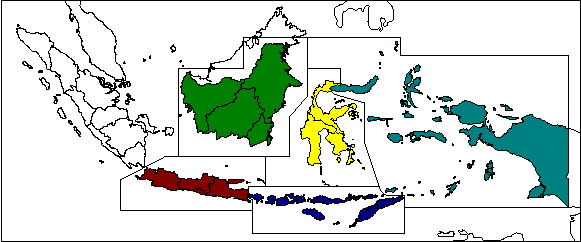
For logistic reasons and for decentralization, the project has been split in five regions (see Map 1), with five regional centers in Jakarta, Samarinda, Denpasar, Ujungpandang and Manado.
Map 1:
Regional Setup of LREPP-II/B
Some 450 personmonths consultancy services have been given at the end of the project. 11 experts (1 team leader, 1 information system specialist, 1 mapping specialist, 8 land use specialists) have been posted in 5 duty stations (headquarter and 5 regional centers).
Some 74 PC and two workstations have been purchased and installed, with 20 A0 inkjet plotters, 19 A0 pen plotters, 22 color page printers, 38 digitizing tablets, 44 ArcInfo licenses, 29 Erdas licenses. (All figures are estimates, can be up to 15% higher).
|
|
|
GIS Project
|
|
|
While ArcInfo is not considered as the most user-friendly and as the 'state of art', it is still the GIS market leader with its data format, its abundance of data and expertise worldwide, its strong ability to 'application development' with SML, CML, AML languages, and its full functionality. Therefore, it can still be recommended to large organizations for GIS implementations. Similarly, this is true for the DBMS, where dBase is not the 'state of art', but has as the first major RDBMS software set the international standards. xBase is still considered as the data format standard. For image processing, installed Erdas 7.5 is now out of the market. Erdas Imagine seems to keep the expectations for an approach as described here (it is presently being installed), as well does Ilwis. |
Technical Details
|
The described project is a representative example of the second phase of the transfer of an institution to a GIS-operating institution, decentralized and on a relatively 'low-tech' level.
|
|
|
GIS Project
|
The system as well as the institution is now ready for the third phase, the final 'institutionalization' or the 'production scheme' on a nationwide scheme to conduct digital land use mapping and implementation and monitoring of land use planning.
The final target of BPN is the land use mapping, the issue of location permits based on GIS, the implementation and the control of land use planning and of the issue of location permits all over Indonesia (196 Mio. ha), to be executed at BPN headquarter, in 27 BPN provincial offices and in 394 BPN district offices (in total with some 1400 PC units).
Map 2:
Availability of LREPP-II Maps of Land Use
(Sample of Jawa: Region 1, automatically generated as metadatabank)
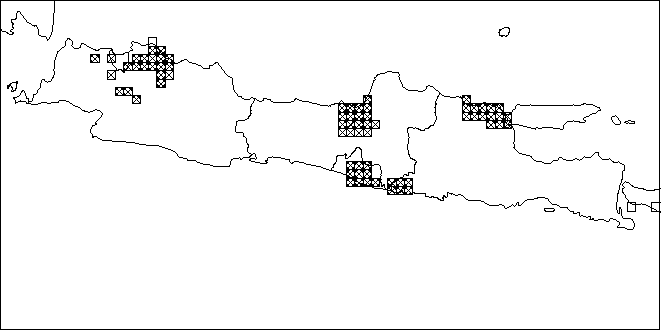
[See updated regional maps of Sumatera, Jawa, Bali + Nusa Tenggara, Kalimantan, Sulawesi, Maluku + Irian Jaya]


PART II: APPLICATION
5. Concept: ILUD
After clarification of the objectives of the GIS at the agency BPN, a concept was defined, based on three 'preconditions', four 'frame components' where the GIS core is integrated in, and the three execution levels.
|
|
|
GIS Project
|
The direct objective was to produce structured data in large quantities, which can be directly used for land use planning.
5.1 Preconditions
Preconditions for the concept in the project were:
- User-friendliness : Except a very few permanent users of GIS, most of the users (technical staff to enter and compile data, or management to retrieve or query data) are not permanently working with GIS applications. Most users do not have previous GIS experience. Thus, processing steps and commands have to be easy, or even (as far as possible) automatically executed. Command line level was not acceptable.
This was based on early experiences made in the project. The result of the human resource assessment was the recommendation for a user interface, which can be applied at all BPN offices (see also Part 8.2).
|
|
|
GIS Project
|
- Standardization : In all those many offices of BPN, it was not acceptable, that different codes, different technical approaches, different file names, different file structures etc. would be applied. In such a case, data can not be transferred from one province to another, not to headquarter, and not to other agencies. If data can not be used and can not be transferred to other users, they are considered as being useless.
- Performance : To fulfill the requests of fast, reliable, transparent data processing to satisfy and to support the decision makers in their difficult task of land use planning, it is obvious, that such a system has to run smoothly, can cope with large amount of data and that it can perform much faster and more accurate than the manual approach: 'We talk about hours rather than weeks' for the digital work !
Over a period of two years, with many discussions, workshops, meetings and feedback from provinces and regions, a system has been developed, which fulfills these preconditions, and which shows full viability.
5.2 'GIS Core' and 'Frame Components'
This system ILUD ('Indonesian Land Use Databank') consists - in data and software terms - of three parts:
- GIS (with Arc/Info),
- DBMS (with dBase data files and Clipper5 exe files), and
- remote sensing (with Erdas).
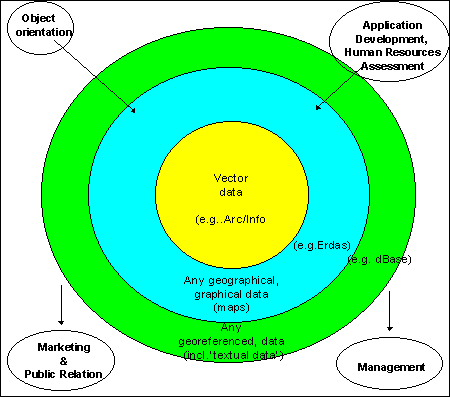
Beside these preconditions of the GIS concept (user friendliness, standardization, performance), following components are forming an institutionalized GIS application (Fig.2):
- Digital GIS core (see following Part 5.3)
- Objective orientation (as discussed in Part 2 and 3)
- Human resources assessment (as discussed earlier):
- In LREPP, it resulted in the development of the user interface 'ILUD'.
- Marketing and PR:
- Activities and data have to be made public, both within the agency and outside. New information technologies offer perfect tools. A distribution and sales policy is to be set up (see Part 8.4).
- Management:
- After GIS installation, this is the greatest challenge - and decisive factor for the GIS diffusion , 'above the technical level'. It has to be necessary, that some technical expertise can be 'carried forward to the upper management level' ! While the installation of a GIS at the technical level can take months up to a few years (3 years in the described case), the management adjustment and re-arrangement of an agency to digital data flow have to be often seen as a 'gradual process' and easily take years .... or decades ...
|
|
|
GIS Project
|
Fig.2: Components of the GIS
(Core and Frame Components)
To perform all these requirements, it was preferred to introduce an acronym as a 'task name', where everybody can associate achievements and data with. In the project, it was the term 'ILUD', which stands for 'Indonesian Land Use Databank'.
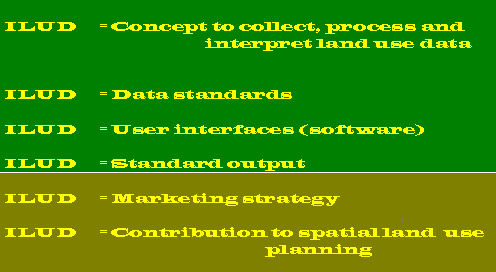
Obviously, in a second stage diffusion project (for implementation) particular emphasis has been given to the second and third item.
5.3 Execution Levels of 'GIS Core'
In the actual GIS core, execution is done at three hierarchical levels. They are equally important, but work started from the top ! The levels are related and depend on each other !
|
|
Fig.3: Levels of Project Execution |
GIS Project
|
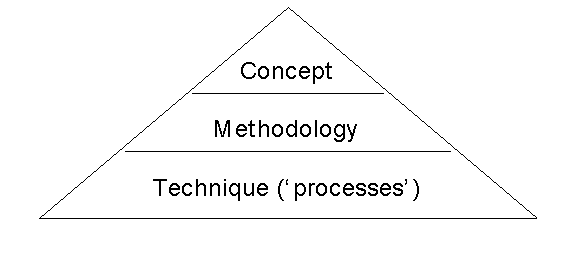
- Concept:
Definition of the general steps how to achieve the goal of an agency (at second or third GIS diffusion stages) or of a project (first stage). It is expressed in rather general terms such as land evaluation, mapping, land use zoning, suitability assessment. Often, it can be found in 'ToR' or 'MoU'.
In the presented project (see Fig.4), there have been two conceptional tasks: Land use mapping and spatial land use management planning. The former was defined in the ToR and in the 'Inception Report' (October 1994) of the project, while the latter was more complex and defined based on the requests of BPN officials, in a process of some 10-20 discussions sessions and meetings.
- Methodology:
More detailed than the concept, the methodology describes the steps and models which are necessary to achieve the concept. Terms such as overlay, file names, standards, land characteristics, quality control etc. can be found.
In the presented project (see Parts 6 and 7), various week-long workshops with 10 - 100 participants have been organized, to develop the methodology - and later to evaluate it, to receive feedback, and to correct it.
- Techniques (or 'processes'):
At the technical level, a profound hardware and software knowledge has to exist to execute the tasks defined earlier. In general, it is easier to discuss the more general aspects and more difficult to find expertise to combine the technical aspects with the required task, i.e. to make the methodology 'feasible' and 'implementable'.
|
|
|
GIS Project
|
|
|
|
GIS Project
|
Fig.4: General Concept

6. Methodology and Techniques: Land Use Mapping: ILUD Software for Mapping
The methodology to execute above mentioned concepts and to achieve the requested tasks can be split into two major parts:
6.1 Methodology for land use mapping 6.1a Land use mapping from aerial photographs If aerial photos are the primary data source, aerial photo interpretation will be undertaken with delineation of 'API units' with stereoscopes. This is followed by field work, where for each defined mapping unit (not for each polygon) 1-10 samples are taken and their land use is described. Such a description both in terms of land use indicators (e.g., distance of houses, height of trees, etc. for the functionality: 'land use', not only 'land cover') as well as in terms of predefined land use classes is important because these data will be used for medium and large scale survey. Additionally, land use indicators (descriptions) can be used to check vs. the classification. The delineation of API will be digitized (using software module ILUDArc). Photo codes, which do not directly indicate the land use, are entered as polygon identifiers. This is called 'labeling' and is handled by module ILUDLab. Field data are entered in the DBMS with module ILUDEntr, processed with ILUDProc to assess the relationship between the photo interpretation codes and the actual land use (from the field descriptions). The result indicates, which land use class(es) occur(s) in each photo unit. This is then linked to the GIS data (with ILUDLab). The linked maps contain information about primary and secondary land use with their ratio, their numerical code, and their character code (abbreviation). It includes additional parameters such as the number of the province, the year of the survey, a quality control figure, and the software version (see Annex for a sample of the attribute data of the land use maps). All this information is automatically added during the linkage procedure with module ILUDLab. Topology is complete. Due to the size of Indonesia stretching over 9 UTM zones (90º - 144º E), and to keep all georeferences unique, data are always stored in geographical units (latitude/longitude). The map can then be plotted with module ILUDPlt, which includes a formal data integrity check (data completeness), for complete topology, for correct georeference etc. This is part of the quality assurance of the digital data. The plot can be done on a plotter or printer in any size. Alternatively, final maps can be transferred to other graphic formats (see also Part 8.2 and Annex). The plotted hardcopy maps follows a standard map layout based on the national grid system. Optionally, maps can be plotted based on administrative boundaries, e.g. for a District or a Subdistrict (with preparation through ILUDAdm, which 'clips' and aggregates map sheets). Care is taken for these cases if two substantially different land uses occur in one mapping unit, i.e. sparsely settled villages between fruit trees (in Indonesia called 'mixed gardens', or fish ponds in a mixed pattern with paddy rice fields). These cases can not be differentiated by photo interpretation, but they are often obvious in the field. These are 'complex units' and are identified both in the databank (with their ratio) and on plotted land use maps.
Tab.1: ILUD Cycle for Land Use Mapping from Aerial Photographs
Step Process Com-ponent Module Result Time 1 Aerial photo interpretation - (manually) Manuscript map ('API map') 1-4 days 2 Field work - (manually) Field data sheets 1-4 days (2) 3 Entry of field data DBMS ILUDEntr Data file with land use descriptions 1/2-2 days (2) 4 Processing of field data DBMS ILUDProc Data file with info about land use per interpretation code 10-30 min 5 Digitization of arcs GIS ILUDArc Raw digitized map ('Z coverage') 1-3 days 6 Labeling of polygons GIS ILUDLab Map coverage with labels and topology 1/2-1 day 7 Link DBMS - GIS GIS ILUDLab Digital land use map 5-20 min 8 Conversion to lat/long GIS ILUDCon -"- 3-5 min 9 Clipping GIS ILUDUtl -"- 10 min 10 Plotting GIS ILUDPlt Hardcopy map 20-40 min 11 Backup GIS ILUDUtl Backup copy 1-3 min (1) Per map sheet (2) Data collected/processed per 'study area', time given on pro-rata basis Various alternative approaches have been practiced and are installed in the system, such as digitization from aerial photographs, digitization of observation points from the tablet, transfer of observation points from DBMS to GIS and v.v., different generalization levels, selection between two land use classification systems, conversion from digitizer units to lat/long or UTM, manual editing of labels at map plot, etc. Fig.5: Land Use Mapping Methodology (ILUD Cycle)
for Assessment of Current Land Use Tab.2: Individual Processes of Land Use Mapping from Aerial Photographs Technical Details Step Process Processes Commands 1 API Delineation of homogenous units - 2 Field work Field work design (stratified, random,
clustered sampling method) - 3 Entry of field data Define dbf file (if new survey year) dB/Cl5: copy structure 4 Processing of field data Searching for 'API codes' dB/Cl5: asort 5 Digitization of arcs Create coverage AI: create 6 Labeling of polygons Build topology AI: build 7 Link DBMS - GIS Check/clean file structure AI: build - dropitem - 8 Conversion to lat/long Check for georeference (UTM or
lat/long or dig. units) AI: tables.list 9 Clipping Mathematical calculation of map frame acc. national grid AI: generate.lines 10 Plotting Many checks for topology, labeling etc. AI: tables.list 11 Backup Compress all GIS coverages and associated DBMS data per sheet pkzip

Assignment of 'API codes' (not land use classes)
(Semi)controlled mosaic
Transfer to base map
Field descriptions
Field correlation matrix
Add new record for each observ. site
Enter data for each site (controlled, checked and coded)
dB/Cl5: append blank
dB/Cl5: replace
For each 'API code': Search for all observations with the 'API code'
Assignment of dominant land use class(es) per 'API code'
Transfer to 'polygon attribute' dbf file
dB/Cl5: array
calculations
dB/Cl5: copy structure -
append blank -
replace
Avoid double user ids
Digitize arcs
Delete/Split arcs
Move nods
Clean arcs ('overshoots') and Checks
AI: calculat $id
AE: ef arcs - add
AE:ef arcs - delete - split
AE: ef node -move
clean
Create one label per polygon
Assign label
AI: createla - calculat -
idedit - build
AE: ef labels - moveitem
Merging result from DBMS (PA dbf file)
to coverage for extended attr.table
tables.list
AI: joinitem - additem
Option of direct or tic-based conversion
Convert
Re-build topology
AI: project cover
AI: build
Convert coverage+map frame to UTM
Standardize fuzzy tolerance
1.clipping, 10% outside frame
2.clipping, precise
Rebuilding topology
AI: project cover
delete TOL.
AI: clip
AI: clip
AI: build
Convert to UTM
Creation of plot file with all features
Plot
AI: project cover
AP: displ 1039
hpgl2 - x.hp2
(1) dB: dBase - Cl5: Clipper5 - AI: ArcInfo - AE: ArcEdit - AP: ArcPlot
|
|
Various quality control checks ('formal data integrity checks') are integrated in the software modules, such as:
|
Technical Details
|
|
|
A number of utility sets are available, e.g. for:
|
Technical Details
|
If the software modules are being applied
6.1b Land use mapping from satellite images
If satellite images are available, image processing of the scenes will be done in Erdas (7.5 or Imagine) with ILUDRs (not operational yet) and spectrally classified.
|
|
The image processing includes data import, enhancement, geometric correction, unsupervised classification with 27 classes, check of GIS file signature with image LAN file, optionally merging of signatures of obvious identical land use classes, assignment of new colors, and finally filtering of 3x3 for TM images. |
Technical Details
|
The approach of an unsupervised classification was chosen because of the inexperience of the staff, the complex land use patterns, which can not be differentiated with spectral classification signatures, and the stress of large scale inventory and mapping for land use planning and land allocation permits. Collection of field data is not a major problem at the institution and results in more reliable data about land use definitions.
After conversion to vector format in the GIS (with module ILUDR2v), this 'spectral classification map' is taken to the field and serves as a basis for the field data collection. Further processing is identical to above described procedure from the aerial photo interpretation, including the 'labeling' for land use classification, field work, and field data entry.
Tab.3: ILUD Cycle for Land Use Mapping from Satellite Image
|
Step |
Task |
Com-ponent |
Module |
Result |
Time (1) |
||
|
1 |
Image processing |
RS |
ILUDRs (3) |
Classified image file |
1/2 - 2 days |
||
|
2 |
Transfer to GIS (vector) |
GIS |
ILUDR2v |
Spectral classifi-cation coverage |
1/2 - 4 hrs |
||
|
3 |
Plotting of remote sensing result |
GIS |
ILUDPlt |
Hardcopy map of spectral image |
20-40 min |
||
|
4 |
Field work |
- |
(manually) |
Field data sheets |
1-4 days (2) |
||
|
5 |
Entry of field data |
DBMS |
ILUDEntr |
Data file with all land use descriptions |
1/2-2 days (2) |
||
|
6 |
Processing of field data |
DBMS |
ILUDProc |
Data file with info about inter- pretation codes |
10-30 min |
||
|
7 |
Labeling of polygons (per spectral class) |
GIS |
ILUDLab |
Map coverage with labels and topology |
15 min |
||
|
8 |
Link DBMS - GIS |
GIS |
ILUDLab |
Digital land use map |
5-20 min |
||
|
9 |
Plotting |
GIS |
ILUDPlt |
Hardcopy map |
20-40 min |
||
|
10 |
Backup |
GIS |
ILUDUtl |
Backup copy |
1-3 min |
||
(1) Per map sheet
(2) Data collected/processed per 'study area', time given on pro-rata basis
(3) Not completed yet
|
|
Tab.4: Individual Processes of Land Use Mapping from Satellite Images |
Technical Details
|
|
Step |
Process |
Processes |
Commands |
|
1 |
Image processing |
Data input |
|
|
2 |
Transfer to GIS (vector) |
Convert to vector format |
AI: gridpoly |
|
3 |
Plotting of remote sensing result |
Convert to UTM |
AI: project cover |
|
4 |
Field work |
(same as API) |
|
|
5 |
Entry of field data |
(same as API) |
|
|
6 |
Processing of field data |
(same as API) |
|
|
7 |
Labeling of polygons (per spectral class) |
Build topology |
AI: build |
|
8 |
Link DBMS - GIS |
(same as API) |
|
|
9 |
Plotting |
(same as API) |
|
|
10 |
Backup |
(same as API) |
|
(1) dB: dBase - Cl5: Clipper5 - AI: ArcInfo - AE: ArcEdit - AP: ArcPlot - E:Erdas 7.5
7. Methodology and Techniques: Spatial Land Use Management Plan (Land Allocations):
ILUD Software for Land Allocation
BPN has the task to execute land use planning through the issue of location permits, including their control and monitoring. Particularly, the latter: control and monitoring of permits, was not handled efficiently and consistently in the past. The described GIS system ILUD includes these activities, to support BPN in its task.
7.1 Availability of Land under the Actual Land Use and Legislation
Land can only be allocated to new land use pattern, if the actual land use under the land use legislation permits it. In Indonesia, land can not be allocated to new land uses, where steep slopes or shallow soils can not maintain a sustainable use, where land would be taken out of the main food production cycle (paddy rice land), along rivers in 50 m corridors, in already built-up areas, or in already assigned land. Most of these regulations are defined as presidential degrees.
The processing (overlay of land use, slope, altitude, hydrology, already allocated land) is done with module ILUDSed.
7.2 Land Evaluation
The physical land evaluation basically follows the concept of FAO's framework for land evaluation, with the definition of land utilization types, land characteristics, land qualities, suitability ratings of S1-N2.
As data sources, resources maps with information about slope, altitude, drainage, erosion status, texture, drainage are linked and matched with the requirements of land use types (land utilization types, here called 'sectors'). At the present 20 of those types are defined with their requirements:
Tab.5: Considered Land Utilization Types
- Permanent production forest
- Limited production forest
- Converted production forest
- Rice paddy
- Maize
- Peanut
- Soybean
- Banana
- Oil palm
- Rubber
- Cacao
- Coffee
- Tea
- Animal husbandry
- Fishery, aquaculture
- Urban settlement
- Rural settlement
- Industry
- Tourism
- Mining
As soon as more data types become available and need arises for more detailed assessment, they will be incorporated.
For user-friendly application, high performance and standardized output, a module to execute land evaluation, i.e. to assess the suitability in terms of suitable and unsuitable classes (S1, S2, S3, N1, N2) for specific land utilization types has been developed (module ILUDKes). It overlays slope, soils, and altitude maps, evaluates the suitability for the selected land use type for each land characteristic, and summarizes based on the limiting factor approach.
7.3 Government Policy for Development
These maps are 'input maps' to the spatial land use management procedure. They have been defined by planning councils at various levels, not by BPN, partly based on the findings of the previously explained two maps (land availability map and land suitability maps).
7.4 Land Allocation ('Spatial Land Use Management Plan')
With the two assessments of land availability and land suitability (see Part 7.1 and 7.2) and with the third input of Government policy, where land use should be developed according to the 5-year Development Plans of Indonesia (at national, provincial, or district level), land can be allocated.
The execution of this double overlay is done with module ILUDUnt.
Example: A housing complex can only be permitted, if the suitability is good (not steep slope), the availability is given (not replacing rice land), and where the development policy does not declare other priorities.
7.5 Monitoring of Land Use Changes and Location Permits
Monitoring is understood at two stages: At the first step, it is the detection of land use changes, i.e. taking two land use maps of different years and compare them. (Overlay of two maps to define units which are not equal).
At the next level - and more important in terms of land use control - is the integration of issued location permits to the land use change detection. There are following units resulting from such an overlay:
- Land use has changed, in accordance with the issued location permit.
- Land use has changed, without permission.
- Land use has not changed, but a location permit was issued.
- Land use has not changed, no location permit was issued.
Tab.6: ILUD Cycle for Spatial Land Use Management Planning
|
Step |
Task |
Com-ponent |
Module |
Result |
Time (1) |
|
1 |
Assess current land use |
GIS |
described above |
Digital land use map |
(4-15 days)(2) |
|
2 |
Check/Convert additional input maps |
GIS |
ILUDUtl |
Digital maps of: slope, hydrology, soils, altitude, Govt.policy |
20 min - 2 days |
|
3 |
Assess land availability |
GIS |
ILUDSed |
Land availability map |
20-30 min |
|
4 |
Assess land suitability |
GIS |
ILUDKes |
Land suitability maps (for particular land uses) |
10-20 min |
|
5 |
Assess land for allocation permits ('spatial land use management plan') |
GIS |
ILUDUnt |
Land allocation maps (for particular land uses) |
10-20 min |
|
6 |
Monitor changes |
GIS |
ILUDMon |
Monitoring map |
10-20 min |
|
7 |
Plot any of those maps |
GIS |
ILUDPlt |
Hardcopy map |
20-40 min |
(1) Per map sheet
(2) Data collected/processed per 'study area', time given on pro-rata basis
|
|
Tab.7: Individual Processes of Spatial Land Use Management Planning |
Technical Details
|
|
Step |
Process |
Processes |
Commands |
|
1 |
Assess land use |
Described in Part 6 |
|
|
2 |
Check/Convert additional input maps |
Check manually |
AI: tables.items |
|
3 |
Assess land availability |
Check all file structures |
|
|
4 |
Assess land suitability |
Selection of land use type |
|
|
5 |
Assess land for allocation |
Selection of land use type |
|
|
6 |
Monitor changes |
Check file structures |
|
|
7 |
Plot of any of those maps |
(see above) |
|
(1) dB: dBase - Cl5: Clipper5 - AI: ArcInfo - AE: ArcEdit - AP: ArcPlot - E:Erdas 7.5
Fig.7: 'Spatial Land Use Management' Methodology (ILUD Cycle)
for Allocation of Location Permits and Its Monitoring 8.1 Standardization: ILUD Standards If data are not standardized, uniquely structured and catalogued with their metadata, there will be the situation of 'having an ocean of data, but only drops of information'. It is important to guarantee that all GIS data are in a well structured, transparent system. A standardized information system was established nationwide. The main goal was to avoid that staff in the many offices of BPN (more than 400) would develop their own ideas up to that point that in every office different codes and different data 'systems' will be used. It even has happened that in the same office, from operator A to operator B, no exchange of data was possible ! This had to be prevented by any means ! Any information system has to define in an early stage, how the coding will be done. A data dictionary has to be defined and agreed on. Every staff member has to follow these rules: Either by order of the supervisors and of the senior management, and/or by software. GIS Project Therefore, a complete set of data standards ('Technical specs') with definitions on:
has been defined and used, and is presently expecting the clearance by the Minister. All data entry and processing operations follow the same procedures (i.e. the concept), have the same coding (e.g. land use classification codes, road classification codes etc.), follow the same file naming syntax, have the same file structure in each component, geographical references are unique, their map sheet numbering system is structured and geometric, etc. All this is 'transparent': Any data user and data owner of BPN / ILUD data can have a look at these standards and conventions. They are documented in software manuals, guidelines, training manuals, and are available electronically anytime by anybody at the Internet at address http://www.geocities.com/Tokyo/2439/ .
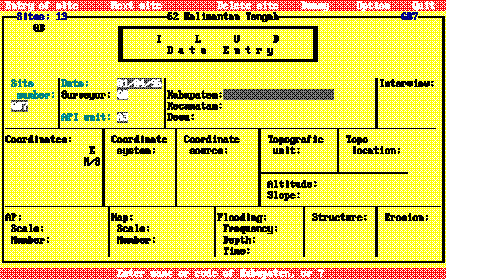
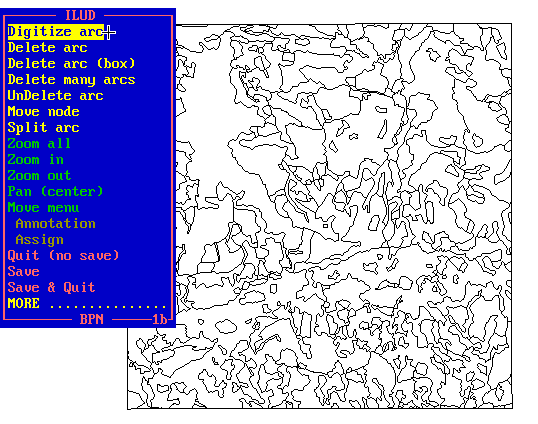
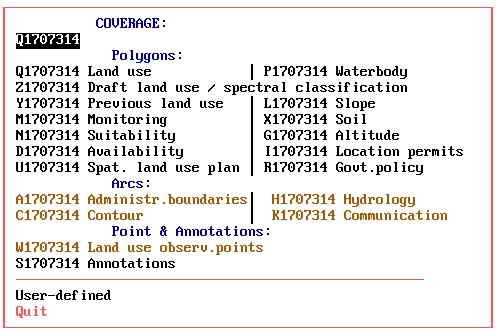
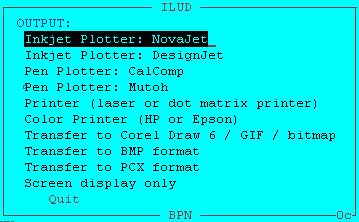
The land use classification, as the core of the data dictionary, is a hierarchical, structural classification system, which can be extended for larger scales, i.e. at urban areas, and which has been defined to satisfy the requests of future users. It contains: At a first glance, this classification seems to be rather detailed. This is due to the scale (maximum mapping scale 1:25,000) and the purpose (the need !) to use these data for land use planning. One remark on the classification: While it is important to have a standard classification that users are familiar with and can work with, it does not mean that a GIS has to rely solely on those classes. In ILUD, there is an extended textual 'attribute' database (DBMS) behind the classification and behind the standard map display. This will become more important in future, when more specific requests will be made for specific land use mapping features, such as query requests for display or statistics for one specific land use type. These 'attribute' data are stored in dBase dbf files, and are processed by Clipper exe routines. Technical Details 8.2 Software for user interface Many GIS software packages are overloaded with functions, which makes them powerful at one side, but dangerous on the other side for the institutionalization by an agency. Staff will be inclined to 'play around' with too many functions, and loose the view on their task ! It can easily happen, that people are 'dragged away' by all the nice, but rather useless pictures on-screen in true colors and with high resolution, at the 'state of art'. The above mentioned concept and standards can only be guaranteed by introduction of a user interface. All operators follow a well established sequence in their tasks of data entry, processing and retrieval. The rather complex chart of the concept comes down to an easy-to-follow, step-by-step routine (see Tab.1,3,5). A stream-lining of the procedures is necessary in an implementation and production
scheme. GIS Project Introduction of an easy, user-friendly interface was a 'must' to establish a GIS in a huge organization with decentralized structure, but request for a nationwide unique technical approach. In the described project, there was no alternative to the full software ('user interface') environment, often described as 'application development'. A software interface was developed, with restrictions to the necessary, essential functions, to guide object-oriented through the process - and the various software. Beside the 'stream-lining' effect, the user interface had to be most user-friendly. As assessed earlier as a precondition of the project (Part 5), the system has to be applicable 'on ease' by the staff. The only menu options to be answered are of general nature, which can be understood by the staff easily after a short introduction to the system - questions such as which year, which province, which printer, with or without annotations on the plotted map, which generalization level etc. (see following Figs. 8-10). One advantage of such a system is the low training requirement of staff. Training had to be given to:
An early 'human resource assessment' is essential in every project to define the level of process execution. The most important aspects at the HRA are:
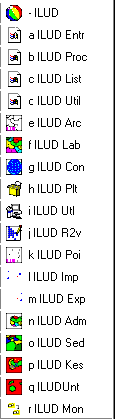
After the HRA, the methodology has to be selected and defined accordingly ! GIS Project Fig.8: Sample Screen for Data Entry to DBMS Fig.9: Sample Screen for Data Entry to GIS (Digitization) Fig.10: Sample Screens for Data Retrieval In total, 18 modules have been developed. Most of them are mentioned earlier in Parts 6 and 7. These ILUD modules run on DOS, Windows 3.x, Windows 95 and in near future on Solaris (workstation). Many of them include internal error trapping routines. To give an idea of the magnitude of the user interface software: Presently, 1462 kB of source codes for the GIS (sml files), 916 kB of source codes for the DBMS (prg files), 78 kB of other source codes (Pascal, DOS batches, Lotus macros), 198 kB auxiliary data files have been developed. Programs have been distributed only in compiled form (Clipper compiler for DBMS to generate exe file, pseudo ArcInfo compiler to generate cml/cmx files) for two reasons:
The entire software fits compressed on three floppy disks (two for GIS, one for DBMS). All programs are bi-lingual (English and Indonesian). Technical Details The success showed that all maps which have been compiled by the ILUD software (interfaces on top of Arc/Info and dBase IV) are structurally good, follow the same data coding, can be exchanged easily and fulfill data quality standards.
8.3 Standard output It is important that data which have been collected and entered in a database, can be retrieved and transferred (or displayed or printed) in an easy and particularly standardized way ! Only when an information system can supply the data in the way as requested by the users of the data is the system justified. If, for example, the user wants to have a look at the hardcopy map for orientation only, he can be supplied with a hardcopy map. If the user wants to further process the data digitally, he can be supplied with the GIS digital data (coverage). As of 1997, the most common output formats are: To offer a wide variability of outputs for the customer, the GIS is recommended to produce output in (at least) those two formats ! GIS Project
The project has a standard layout for hardcopy map production at the scales of 1:25,000, 1:50,000 and 1:100,000 at DIN A0 size, following the national map grid index. Digital outputs of the project's mapping are various graphics formats such as BMP, PCX or PLT files, or the original data in their coverage, xBase, GIS file formats. Beside the 'standard' output maps of land use and land use plans, the system is capable to respond on special requests, such as:
Ease of backup is another important issue and important for operationality of GIS applications: For complete and easy transfer of collected data, a software-guided creation of data copy sets is possible: Through a few menu-driven keystrokes, the operator makes a full copy of the original data, which at the user's side can be 'imported' through an ILUD routine, or through standard commercial software (e.g. Pkzip, dBase, DOS, Arc/Info etc.).
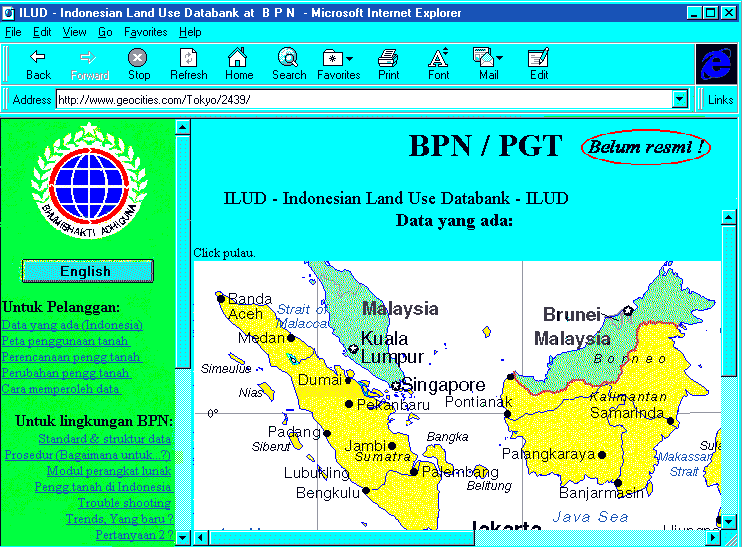
8.4 Marketing strategy and PR 'Information not used is information better not collected !' To enable potential clients to make use of these maps and to integrate this information in their planning efforts, they have to be aware of the data and all facilities. Various activities, intentions and plans for such 'public relation' work have been set up in the project: The most global PR system is the Internet. A homepage (
http://www.geocities.com/Tokyo/2439/)
has been set up, which shows the data progress achieved, the facilities of the system, the technical specs and options to contact the agency for data and technical advise.
Data requests can be made through the Internet. After having been cleared by BPN officials, data can be transmitted on disk or through the Internet. Metadata are given to the National Mapping Agency of Indonesia in regular intervals. They incorporate these metafiles in their national map catalogue. A policy of distributing and/or selling data is in the process of being defined. Cost assessments to define a 'service fee' have been calculated:
8.5 Quality Control Quality Control is very important, if data are made public to clients - or sold - and if actual use (here: land use planning and monitoring) is made of the data. The user has to know, with which reliability level he can use the data. In the described project, quality control is understood in two stages:
While the first aspect has been described in the project in form of manuals and applied through on-the-job training, the later has so far only been preliminary defined for land use mapping. 9. Concluding Evaluation and Outlook on Future Development
9.1 Evaluation and Recommendations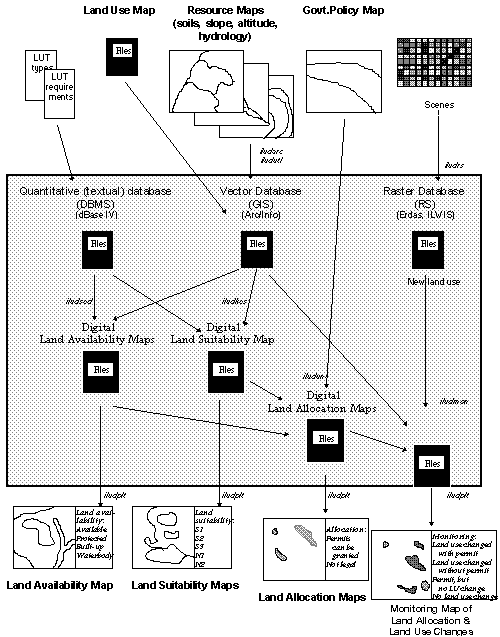
8. Further Institutional Aspects
PART III: EVALUATION AND OUTLOOK
It was shown in this Paper, that the setup of a GIS project is a complex task, which requires consideration of various fields - and expertise accordingly: To repeat, the three preconditions of the GIS concept (user friendliness, standardization, performance), the four frame components (objective orientation, application development, marketing, management), and the three execution levels (concept, methodology, techniques).
With many crucial aspects been shown, attention shall be drawn again on:
- Human resource assessment: This is most important to start with,
- Techniques: This is the most time consuming,
- Management: This might take the longest time, and is maybe the most important for the diffusion.
During project execution, many unforeseeable problems can occur. Following recommendations shall try to minimize the impact of these problems:
- Balanced input to individual activities and tasks, monitored by the supervisor/ team leader
- Maintaining balance between academic and fast-and-dirty approach, for an applicable methodology
- Stressing the importance of standardization, and the maintenance/update of standardization; staff has to follow standardization rules
- Sufficient memory and harddisk capacity for the computers, software to be selected under the point of view of compatibility and avoidance of memory conflicts
- Avoid data incompatibility at updates of software or operating system by selecting right software and OS (expected life span of software and data formats)
- After installation and professional configuration of hardware and software, staff not be allowed to change configuration.
- Power supply has to be adequate, UPS have to be installed for all devices.
- Permanent viruses scanning
- Budget flexible enough for new technologies, software and hardware procurements in due course of the project; contingency amount sufficient
- Sufficient diversification of training (core training for application developer vs. application training for users)
- Assignment of staff responsible for hardware and data
- Assignment of highly skilled staff
- Attempt to speed up management adaptation and/or re-structuring, as this follows only slowly and long after technical innovation; fasten actual GIS diffusion in the agency.
As it was shown, a fundamental behavioral change opens up to us - with a great chance as well as demand for GTZ to step in.
In the long term, emphasis on the future development and implementation of GIS projects has to handle
- both techniques and data,
- as well as the policies and strategies constructed, using them as a monitoring and management tool.
'People are easily fascinated by hardware and software for image processing and by the pretty pictures produced. Technologists prepared the maps and databases, while decision makers, politicians, government planners, and private corporations ignored them. Apart from cartography, little in the way of concrete outcome could be credited to the technologists.' (A.M.North, Remote Sensing and GIS in Asia, GIS Asia Pacific, p.22, August 1996)
In any GTZ-supported GIS setup, it is important to address the decision makers: the politicians, the planners, the investors, the 'entrepreneurs', the land users, to be aware of the facilities of the system and to make use of the data - and to give constructive feedback to the managers, designers and developers of the information system.
In very near future, it should be up to the 'decision makers' to use all these beautiful tools!
And then we, the 'GTZ-GIS experts', can ask ourselves: Are we doing enough for these 'decision makers', the politicians, government bodies and corporation executives ? Their actions will finally determine whether development will be sustainable or not!
9.2 Future Relevance of GIS as Part of 'Appropriate IT Transfer'
Outlook to the 21. Century
The implementation of a GIS in and the transfer to developing countries will result in adequate supply of information and to a sound planning procedure, as posted in Part 2, at a low cost !
From the cooperation point of view, it is important not to let the gap in development and technology between developing and developed countries widen too much. Information technology develops very fast. Transfer of IT has to cope with this pace. GIS is part of IT; transfer has to be made possible under the consideration of appropriateness.
GIS is a field with very little requirement for such an IT transfer: PC, input and output devices, and a telephone line. This is all what is required in the mainly software and data based field of GIS ... beside the human.
IT transfer to developing countries is not only a challenge, it can also be a great chance for developing countries: 'Brainware is not site-specific'. In the IT era with development of human resources, both rather advanced task (e.g. programming, application developing) as well as labor intense jobs (e.g. data entry) can be outsourced from companies in developed countries to less developed countries. They can then form a resource of income and contribute to a better balance of trade.
Today, this is already practiced in a few countries such as India, East Europe, Russia etc. In future, with further globalization trends and with an ever stronger Internet, this will become more important. It might give a chance to countries to survive, particularly countries where natural resources are limited, but with a 'demographic potential' of people with a relatively high education and awareness level.
GTZ can contribute in its technical cooperation and promote GIS efforts as part of the IT future to be transferred in an appropriate way.
****
The future of the use and importance of GIS is very bright. The technology of GIS has reached a high level of usefulness. It has been shown, that a well-defined and set-up system like the one described can contribute to development and cooperation in the context of appropriate IT transfer.
It is hoped that this Paper can contribute to transfer expertise to new projects which are being set up in the frame of technical cooperation of GTZ.
APPENDIX 1a: Map Themes
|
|
|
Theme |
Type |
|
|
A |
Administration |
Line |
|
|
B |
Administration |
Polygon |
|
|
C |
Contour |
Line |
|
|
D |
Land availability |
Polygon |
|
|
G |
Altitude |
Polygon |
|
|
H |
Hydrology |
Line |
|
|
I |
Location permits |
Polygon |
|
|
K |
Communication |
Line |
|
|
L |
Slope |
Polygon |
|
|
M |
Land use monitoring |
Polygon |
|
|
N |
Suitability assessment (per LUT) |
Polygon |
|
|
P |
Waterbody |
Polygon |
|
|
Q |
Land use |
Polygon |
|
|
R |
Govt. development policy |
Polygon |
|
|
S |
Annotations |
Annot. |
|
|
U |
Spat. land use management plan |
Polygon |
|
|
W |
Land use observation points |
Point |
|
|
X |
Soils |
Polygon |
|
|
Y |
Previous land use |
Polygon |
|
|
Z |
Draft land use, spectral classification |
Polygon |
APPENDIX 1b: Standard File Structure of Land Use Maps
|
Item name: |
Type: |
Width: |
Decimals:
|
|
Sample: |
|
AREA |
N |
13 |
6 |
|
..... |
|
PERIMETER |
N |
13 |
6 |
|
..... |
|
Internal id |
N |
11 |
|
|
..... |
|
User id |
N |
11 |
|
|
(int.id-1) |
|
POLYLAB |
Ch |
8 |
|
|
B |
|
CLAS1 |
Ch |
11 |
|
|
4.1.1 |
|
CLAS1_PRC |
N |
3 |
|
|
100 |
|
CLAS1_NAM |
Ch |
50 |
|
|
Sawah irig. 2xpadi |
|
CLAS1_NMR |
N |
13 |
10 |
|
4.0101 |
|
CLAS2 |
Ch |
11 |
|
|
|
|
CLAS2_PRC |
N |
3 |
|
|
0 |
|
CLAS2_NAM |
Ch |
50 |
|
|
|
|
CLAS2_NMR |
N |
13 |
10 |
|
|
|
PROP |
N |
2 |
|
|
32 |
|
TAHUN |
Ch |
2 |
|
|
95 |
|
QC |
N |
2 |
|
|
|
|
VERSI |
N |
5 |
2 |
|
1.91 |
APPENDIX 2a: Sample for Land Use Map: West-Jawa (Karawang)
APPENDIX 2b: Sample for Land Use Map: Kalimantan (1614-522)
APPENDIX 2c: Sample for Spectral Classification Map (2305-423)
APPENDIX 2d: Sample for Land Availability Map (Cisarua)
APPENDIX 2e: Sample for Land Suitability Map: Tea (Cisarua)
APPENDIX 2f: Sample for Land Suitability Map: Urban (Cisarua)
APPENDIX 2g: Sample for Government Policy Map (Cisarua)
APPENDIX 2h: Sample for Land Allocation Map: Tea Plantation (Cisarua)
APPENDIX 2i: Sample for Land Allocation Map: Urban Extension (Cisarua)
APPENDIX 2j: Sample for Land Allocation Map: Afforestation (Cisarua)
APPENDIX 2k: Sample for Land Use Map: Recent (Pesalakah)
APPENDIX 2l: Sample for Land Use Map: Previous (Pesalakah)
APPENDIX 2m: Sample for Monitoring (Land Use Change Detection)(Pesalakah)
APPENDIX 2n: Sample for Monitoring (including location permits) (Pesalakah)
This paper has been prepared for publication at GTZ
Gerhard Bechtold
mail@GerhardBechtold.com
Information System Specialist
Project LREPP-II (GTZ), Indonesia